EducationSoftwareStrategy.com
StrategyCommunity

Knowledge Base

Product

Community

Knowledge Base

TopicsBrowse ArticlesDeveloper Zone

Product

Download SoftwareProduct DocumentationSecurity Hub

Education

Tutorial VideosSolution GalleryEducation courses

Community

GuidelinesGrandmastersEvents
x_social-icon_white.svglinkedin_social-icon_white.svg
Strategy logoCommunity

© Strategy Inc. All Rights Reserved.

LegalTerms of UsePrivacy Policy
  1. Home
  2. Topics

KB6032: How to Detect if all Jobs are Done Running in MicroStrategy Intelligence Server SDK 9.2.1


Community Admin

• Strategy


In MicroStrategy Desktop 9.2.1, all the jobs currently running appear under Administrator -> Job Monitor. Once a job is done, it is removed from the Job Monitor.
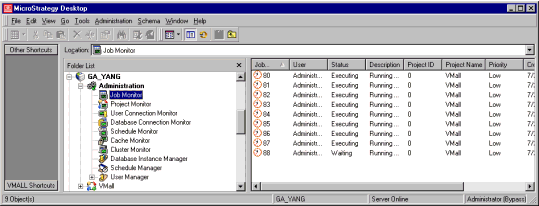
In Strategy Desktop 9.2.1, all the jobs currently running appear under Administrator -> Job Monitor. Once a job is done, it is removed from the Job Monitor.

ka04W000000OdDmQAK_0EM440000002H1P.gif

 
In some cases, it is useful to detect if all jobs are done in Strategy Intelligence Server. For example, it is better to make sure there is no more pending job before kicking off another schedule for warehouse loading.
 
The major API call for this purpose is IDSSJobs::Count(). If the return value from this call is greater than '0', this means that there is still some jobs running; otherwise, it means no more job is pending.
 
The following code example will wait until all jobs is completed before getting into the next operation:


Dim myServerJobs As IDSSJobs 
Set myServerJobs = MyDataSource.ServerAdmin.JobManager.GetJobs(DssGetJobOptionBrowsing, 100, DssServerRefreshAsynch) 

Do While myServerJobs.Count <> 0 

Set myServerJobs = MyDataSource.ServerAdmin.JobManager.GetJobs(DssGetJobOptionBrowsing, 100, DssServerRefreshAsynch) 
'Debug.Print myServerJobs.Count 
Sleep(1000) 

Loop 

'next operations… 


Warning:
This customization is provided as a convenience to Strategy users and is only directly applicable to the version stated. While this code may apply to other releases directly, Strategy Technical Support makes no guarantees that the code provided will apply to any future or previous builds. In the event of a code change in future builds, Strategy may not be able to provide additional code on this matter even though this customization is provided at this time for this specific build.


Comment

0 comments

Details

Knowledge Article

Published:

June 22, 2017

Last Updated:

June 22, 2017