SYMPTOM:
A history list message is synchronized within a cluster when the message is first created and when the job associated with the message has finished execution. For more details on history list synchronization, refer to Strategy Knowledge Base document:
KB5300-071-0175 - How and when does Strategy Intelligence Server 9.x and newer cluster synchronize user History List or Inbox?
When ALL of the following conditions occur simultaneously, a user may see a history list message unsynchronized within a Strategy Intelligence Server cluster:
Under the above conditions, the user session on Node B will see the new history list message created. However, when the job associated with the history list message is finished executing on Node A, the user session on Node B will continue to see the message remain in 'Executing' status. The user session on Node A will see the correct message status of 'Ready'.
When all of the user's sessions on Node B are disconnected, the user's history list will be unloaded from memory on Node B. Afterwards, when the same user is reconnected to Node B, the node will reload the user's history list into memory. When this occurs, the history list message in question will have the correct status of 'Ready'. Under most circumstances, a user will only have one session open on a particular cluster node. Therefore, when the user logs out and logs back in, the user will notice that the history list message will be correctly synchronized.
CAUSE:
The behavior described above is caused by a known issue in Strategy Intelligence Server.
ACTION:
Strategy will continue to investigate and post updates as soon as they are available.
WORKAROUND:
Change the backup frequency for Strategy Intelligence Server to 0. To do this, open the Strategy Intelligence Server Configuration window and go to the Advanced tab. The backup frequency can be changed as shown below:

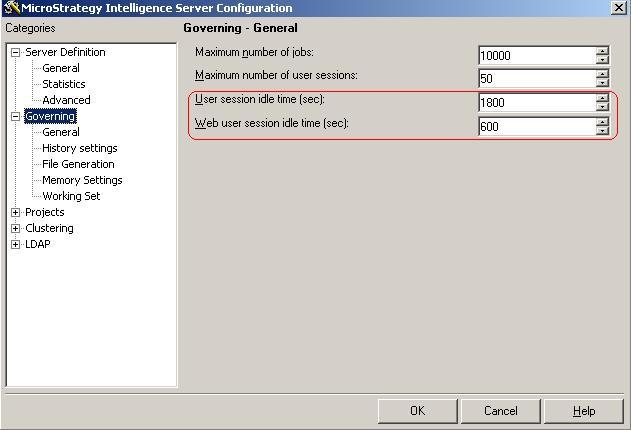
If the backup frequency cannot be set to 0, then the likelihood of the issue affecting users can be reduced by lowering the user session idle time. This way, the likelihood of the same user having multiple sessions open on the same node will be reduced. Then, when a user logs in and creates a new session, the session will be the user's first on that node. As a result, the node will reload the user's history list from disk, and history list messages will be correctly synchronized.
The user session idle time can be set in the Strategy Intelligence Server Configuration window, in the 'Governing' tab.