SYMPTOM:
In Strategy Product Suite, it is possible to define an attribute that has a fact table as its lookup table. For example, consider the following attribute:

Note that the YR_CATEGORY_SLS fact table is used as lookup table for this attribute.

Users can, then, create a count metric based on such an attribute. In this example, a metric with the following formula can be created:
Count(Category)

When users create a report that includes the metric mentioned above, along with a filter on an attribute that does not belong to the same dimension as the attribute in the count metric, the filter is ignored:
Filter: Year In (1998)
Metric: Count(Category)

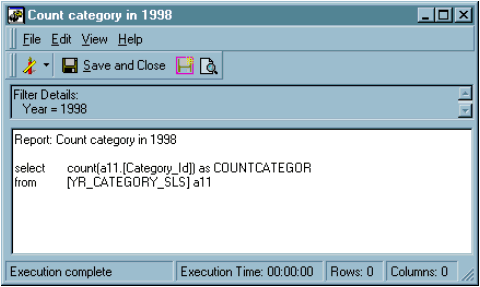
In this report, the 'Year' attribute belongs to a different dimension than the 'Category' attribute. The SQL for the report shown in the previous image is shown below:
select count(a11.) as COUNTCATEGOR
from a11
CAUSE:
By default, metrics that count attribute elements will access the lookup table for the attribute.
Since the attribute in the count metric and the attribute in the filter come from different dimensions, the Strategy SQL Generation Engine assumes that the lookup table for either attribute will not have a reference to the other attribute, even if it is a fact table and it does include a reference to both attributes. Therefore, to avoid a possible Cartesian join, the filter is ignored.
ACTION:
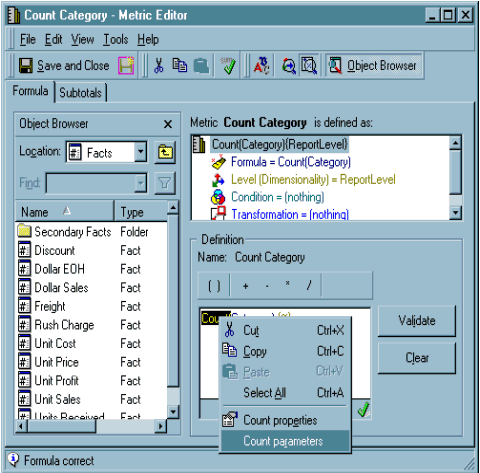
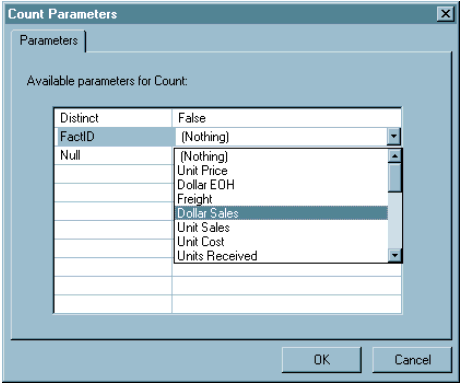
To avoid this scenario, users should configure the 'Fact ID' parameter under the 'Count Parameters' option for the count metric:

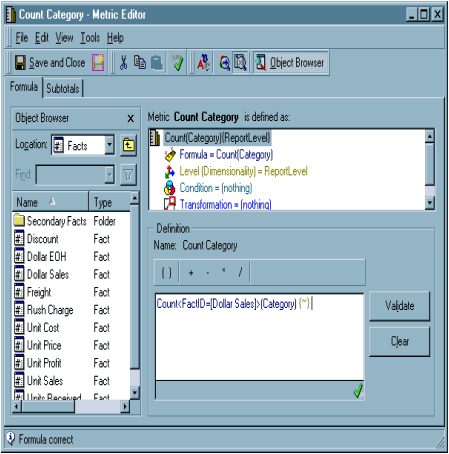
The report now includes the filter in the SQL:
select count(a11.) as COUNTCATEGOR
from a11
where a11. in (1998)

When users specify the 'FactID', the SQL Generation Engine assumes that users want to calculate the count metric against a fact table. As a result, it includes the filter condition in the SQL.
