EducationSoftwareStrategy.com
StrategyCommunity

Knowledge Base

Product

Community

Knowledge Base

TopicsBrowse ArticlesDeveloper Zone

Product

Download SoftwareProduct DocumentationSecurity Hub

Education

Tutorial VideosSolution GalleryEducation courses

Community

GuidelinesGrandmastersEvents
x_social-icon_white.svglinkedin_social-icon_white.svg
Strategy logoCommunity

© Strategy Inc. All Rights Reserved.

LegalTerms of UsePrivacy Policy
  1. Home
  2. Topics

KB6103: When logging into MicroStrategy Developer 9.x and 10.x, the GUI shows many word containing question marks


Stefan Zepeda

Salesforce Solutions Architect • Strategy


When logging into MicroStrategy Developer 9.x and 10.x, the GUI shows many word containing question marks

 
SYMPTOM:
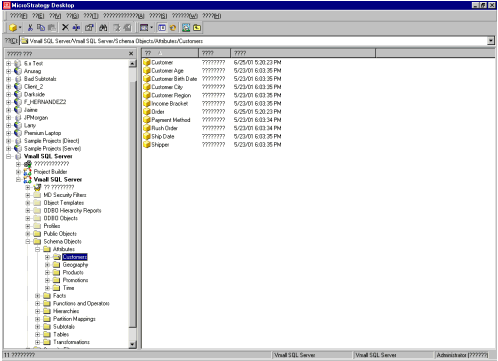
Many of the words in the Strategy Desktop GUI are appearing as question marks instead of readable characters. It affects all aspects of the application and some of the locations affected are shown below.
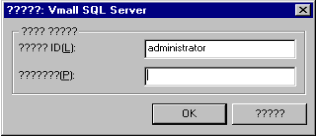
  1. In the project login dialog box:
ka02R000000kbtvQAA_0EM440000002GCw.gif
  1. In the objects folder (attributes):
ka02R000000kbtvQAA_0EM440000002GCv.gif
  1. In the Strategy Desktop Preferences dialog box:
ka02R000000kbtvQAA_0EM440000002GCi.gif

 
CAUSE:
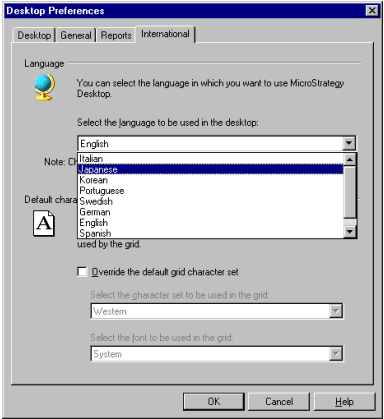
This issue occurs when the language selected contains special characters, in this case Japanese. This language cannot be displayed on a machine with the regional language set to, for instance, English.
 
The change will be made on the 'International' tab of the Strategy Developer Preferences dialog box as shown below. The 'International' tab can be accessed through the following path: Tools > Desktop Preferences > International
ka02R000000kbtvQAA_0EM440000002GDJ.gif

 
NOTE: This is the same dialog box as the third example in the Symptom portion of this document.
 
ACTION:
To fix this issue, a bilateral comparison needs to be made between the affected machine and an unaffected machine with the same version of Strategy installed.

  1. Note the location of the 'Desktop Preferences' on Tools menu on the unaffected machine.
  2. Note the location of the desired language, e.g. English, in the drop down menu on the unaffected machine.
     
    NOTE: It is important that the reference machine be the same version as the affected machine as the list differs slightly between Strategy Developer 9.x and 10.x, versions.
     
     
  3. Navigate to the International tab of the Desktop Preferences window on the affected machine.
  4. Selected the same element from the Language drop down list on the affected machine.
  5. Disconnect from the project source on the affected machine.
  6. Close and re-open Strategy Developer on the affected machine.


Comment

0 comments

Details

Knowledge Article

Published:

June 6, 2017

Last Updated:

June 6, 2017