SYMPTOM:
Some users get duplicate e-mails and there are duplicate entries in the SaveMail folder located in \Program Files\Strategy\Narrowcast Server\Delivery Engine.
NOTE: To save e-mails in the SaveMail folder, users should configure the E-mail (SMTP) Information Transmitter to have the option 'Do Both (Send to Recipient and Save to file)' checked.
The Delivery Engine log (DE log) contains the following error messages:
:1516: DEPing failed on Execution Engine "XXXX"
:1516: Successfully ping host "localhost" with timeout set to 1000
CAUSE:
When the cluster of Strategy Narrowcast Servers 8.x is working properly, both Execution Engines (one on each server) check continually if the other one is up and running by sending pings periodically.
When one Execution Engine (Server B) does not return the ping, the Distrubution Manager (on Server A) starts a new execution of the same segment in the other Execution Engine because it implies that the Execution Engine on Server B is down.
In this case, the Execution Engine on Server B is not down; it is up. The reason for the duplication of e-mails is that the same segment is processed by two different Execution Engines.
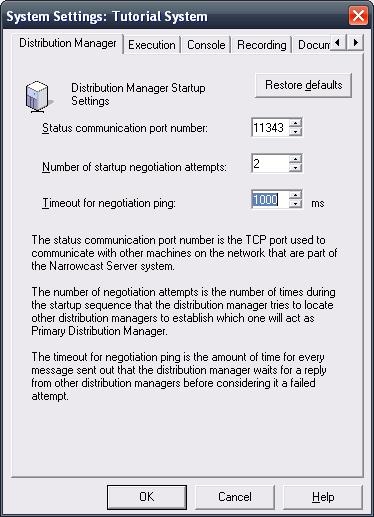
A possible cause for this behavior is the fact that at times, and due to an increased network traffic, the Execution Engine on the second Server might take more time to reply to the ping message than the value stated in the 'Timeout for Negotiating Ping' setting. The default timeout is set to 1000 ms (milliseconds).
ACTION:
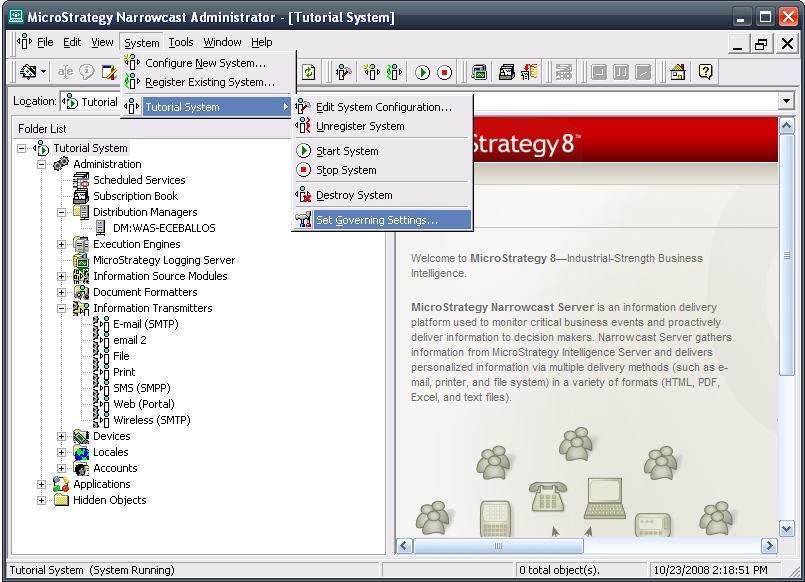
Increase the value of the 'Timeout for Negotiation Ping' setting:
6322
