EducationSoftwareStrategy.com
StrategyCommunity

Knowledge Base

Product

Community

Knowledge Base

TopicsBrowse ArticlesDeveloper Zone

Product

Download SoftwareProduct DocumentationSecurity Hub

Education

Tutorial VideosSolution GalleryEducation courses

Community

GuidelinesGrandmastersEvents
x_social-icon_white.svglinkedin_social-icon_white.svg
Strategy logoCommunity

© Strategy Inc. All Rights Reserved.

LegalTerms of UsePrivacy Policy
  1. Home
  2. Topics

KB6343: How does Connection String Passthrough works in MicroStrategy 9.x


Community Admin

• Strategy


Connection String Passthrough:
 
Users wish to add additional parameters to the database connection string by hand. These extra parameters are used to identify the application/project when monitoring activity from the database, give hints to database load balancers, and other miscellaneous objects that are specific to a particular rollout and cannot be standardized as simple options in the editors.
 
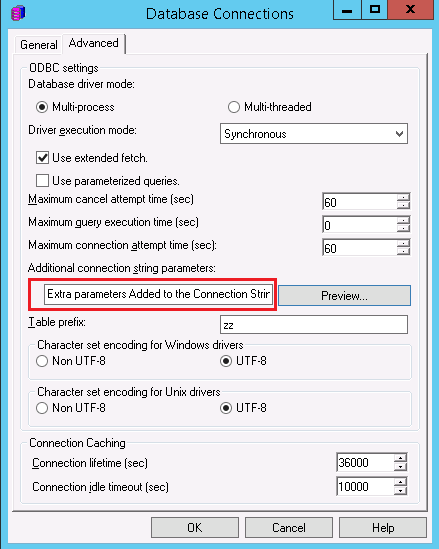
A new field has been added in the 'Advanced' tab of the Database Connection dialog as shown in the picture below:
ka04W000000Oh1zQAC_0EM440000002Bwk.jpeg

 
Users can type anything within this new text field. The extra parameters will be parsed and added to the Connection string of the Data Source Name (DSN).
 
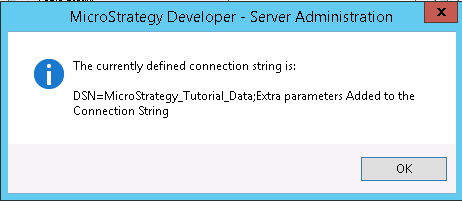
A preview button has been added to allow users to test how their final connection string will look like as shown below:
 

ka04W000000Oh1zQAC_0EM440000002Bwe.jpeg

 
NOTES:

  • The DSN connection string has been parsed and the additional Connection String has been added to it.
  • There is no need to add ';' (a semicolon) to the additional string since this will be done automatically.

Comment

0 comments

Details

Knowledge Article

Published:

June 6, 2017

Last Updated:

June 6, 2017