EducationSoftwareStrategy.com
StrategyCommunity

Knowledge Base

Product

Community

Knowledge Base

TopicsBrowse ArticlesDeveloper Zone

Product

Download SoftwareProduct DocumentationSecurity Hub

Education

Tutorial VideosSolution GalleryEducation courses

Community

GuidelinesGrandmastersEvents
x_social-icon_white.svglinkedin_social-icon_white.svg
Strategy logoCommunity

© Strategy Inc. All Rights Reserved.

LegalTerms of UsePrivacy Policy
  1. Home
  2. Topics

KB6357: Unable to start or stop MicroStrategy Intelligence Server from MicroStrategy Service Manager while they can start or stop the application from Windows Services


Community Admin

• Strategy


When users try to start or stop MicroStrategy Intelligence Server from MicroStrategy Service Manager, nothing happens however they are able to start or stop via Windows Services.

SYMPTOM:
When users try to start or stop Strategy Intelligence Server from Strategy Service Manager, nothing happens. When users try to start and stop Strategy Intelligence Server from Windows Services by going to Settings->Control Panel ->Administrative Tools ->Services, they can start and stop Strategy Intelligence Server without any difficuty.
CAUSE:
One of the possible cause for this issue is that Strategy Service Manager is pointing to another application such as Strategy Enterprise Manager or Strategy Listener.
ACTION:
To resolve this issue, users must follow the steps below:
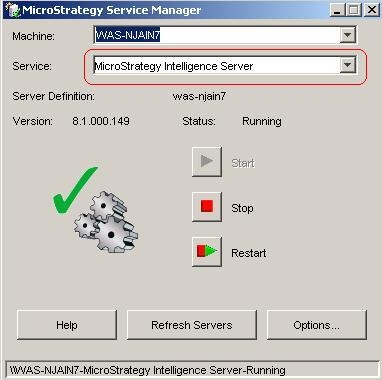
  1. Open Strategy Service Manager.
  2. In Service drop down list, make sure that Strategy Intelligence Server is chosen as shown below
ka04W000000Ohh2QAC_0EM440000002Bwg.jpeg


Comment

0 comments

Details

Knowledge Article

Published:

April 24, 2017

Last Updated:

April 24, 2017