EducationSoftwareStrategy.com
StrategyCommunity

Knowledge Base

Product

Community

Knowledge Base

TopicsBrowse ArticlesDeveloper Zone

Product

Download SoftwareProduct DocumentationSecurity Hub

Education

Tutorial VideosSolution GalleryEducation courses

Community

GuidelinesGrandmastersEvents
x_social-icon_white.svglinkedin_social-icon_white.svg
Strategy logoCommunity

© Strategy Inc. All Rights Reserved.

LegalTerms of UsePrivacy Policy
  1. Home
  2. Topics

KB6360: How to create a report that gives the data for this month and last month without creating transformations in MicroStrategy Developer?


Stefan Zepeda

Salesforce Solutions Architect • Strategy


How to create a report that gives the data for this month and last month without creating transformations in MicroStrategy Developer?

The following solution allows users to create a report giving them data for the current month and pevious months without creating transformations. The follow implementation uses the system date to qualify on the current and previous months for data models using the month dimension format of 'YYYYMM'.
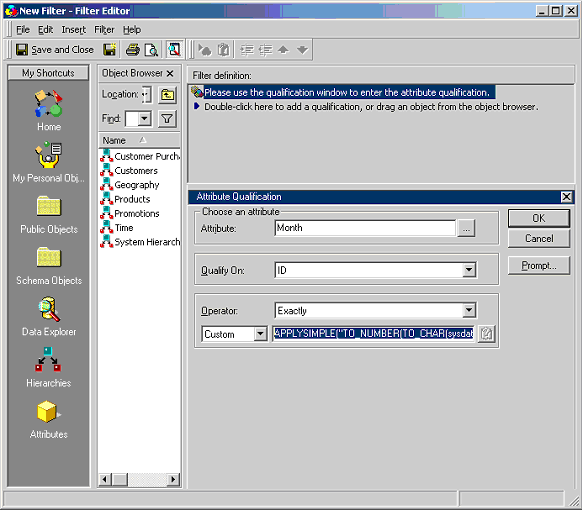
 

  • Create the Current Month Filter.
    • Create a filter (Month) using attribute qualification.
    • Choose 'Month' as the attribute.
    • Qualify on 'ID'.
    • Choose Operator as 'Exactly'.
    • Type in the Apply Simple statement below as a 'Custom Expression'.
      ApplySimple(`TO_NUMBER(CONCAT(TO_CHAR(sysdate, `YYYY`),TO_CHAR(sysdate, `MM`)))`,0)
    • Save the filter (Month).
ka02R000000kboZQAQ_0EM440000002GC4.gif
  • Create the previous Month Filter.
    • Create a filter (Previous Month) using attribute qualification.
    • Choose 'Month' as the attribute.
    • Qualify on 'ID'.
    • Choose Operator as 'Exactly'.
    • Type in the Apply Simple statement below as a 'Custom Expression'.
      ApplySimple(`TO_NUMBER(CONCAT(TO_CHAR(ADD_MONTHS(sysdate, -1), `YYYY`),TO_CHAR(ADD_MONTHS(sysdate, -1), `MM`)))`,0)
       
    • Save the filter (Previous Month).
  • Now add the Current Month Filter and the Previous Month Filters to the report using the OR operator.


NOTE:
The ApplySimple statements given above are ORACLE Specific. The same logical should apply for other databases, but the syntax will need to be changed. Refer to Strategy Knowledge Base document KB5700-007-0107 for more details on writing custom expressions.


Comment

0 comments

Details

Knowledge Article

Published:

June 8, 2017

Last Updated:

June 8, 2017