EducationSoftwareStrategy.com
StrategyCommunity

Knowledge Base

Product

Community

Knowledge Base

TopicsBrowse ArticlesDeveloper Zone

Product

Download SoftwareProduct DocumentationSecurity Hub

Education

Tutorial VideosSolution GalleryEducation courses

Community

GuidelinesGrandmastersEvents
x_social-icon_white.svglinkedin_social-icon_white.svg
Strategy logoCommunity

© Strategy Inc. All Rights Reserved.

LegalTerms of UsePrivacy Policy
  1. Home
  2. Topics

KB6373: User cannot see the ’Advanced Qualification’ option in the Custom Group editor in MicroStrategy Developer 10.x


Stefan Zepeda

Salesforce Solutions Architect • Strategy


When users open the Custom Group Editor, they do not see the option for 'Advanced Qualification' as shown below. However, they have followed the directions to enable this option in the filter editor.

SYMPTOM:
When users open the Custom Group Editor, they do not see the option for 'Advanced Qualification' as shown below. However, they have followed the directions to enable this option in the filter editor.

ka02R000000kVfcQAE_0EM440000002GC9.gif

 
CAUSE:
The radio button does not appear because the option for 'Advanced Qualification' in the Custom Group editor is turned on in a different location than the filter editor.
ACTION:
The following procedure explains how to enable the 'Advanced Qualification' option for Custom Groups.
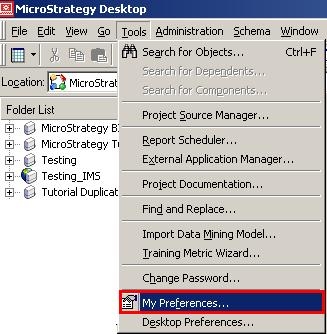
  • Select 'My Preferences from the 'Tools' menu as shown below:
ka02R000000kVfcQAE_0EM440000002GC5.jpeg
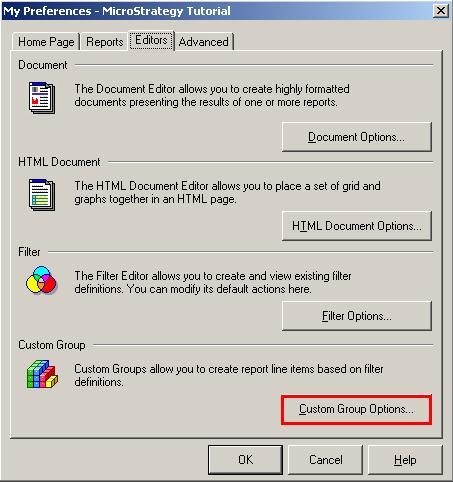
  • Select the 'Custom Group Options' from the 'Editors' tab as shown below:
ka02R000000kVfcQAE_0EM440000002GC8.jpeg
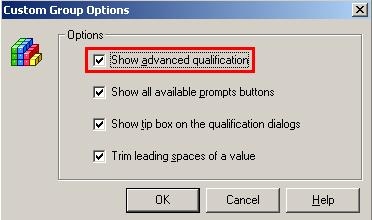
  • Ensure that the first check box 'Show advanced filter qualification' is checked as shown below:
ka02R000000kVfcQAE_0EM440000002GBx.jpeg

 
Now, when users are creating Custom Groups, the 'Advanced Qualification' option is present as shown below:

ka02R000000kVfcQAE_0EM440000002GCB.gif

Comment

0 comments

Details

Knowledge Article

Published:

May 30, 2017

Last Updated:

May 30, 2017