EducationSoftwareStrategy.com
StrategyCommunity

Knowledge Base

Product

Community

Knowledge Base

TopicsBrowse ArticlesDeveloper Zone

Product

Download SoftwareProduct DocumentationSecurity Hub

Education

Tutorial VideosSolution GalleryEducation courses

Community

GuidelinesGrandmastersEvents
x_social-icon_white.svglinkedin_social-icon_white.svg
Strategy logoCommunity

© Strategy Inc. All Rights Reserved.

LegalTerms of UsePrivacy Policy
  1. Home
  2. Topics

KB6435: How does the 'Show option for All' setting work for a grid as selector in MicroStrategy Web


Community Admin

• Strategy


How does the 'Show option for All' setting work for a grid as selector in MicroStrategy Web

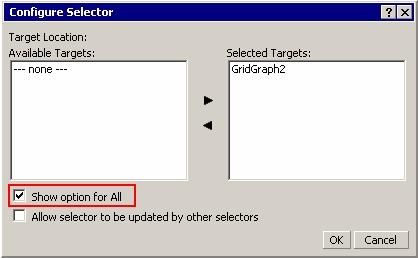
When enabling the 'Show option for all' in a selector, an entry called 'ALL' will usually display in the list of elements to select in Strategy Web. However, when a user enables the same option in a grid as a selector, the 'ALL' entry will not display. Instead, clicking on the attribute name in the grid achieves the same functionality. Selecting the attribute name will display all the elements in the target grid, as shown below:
ka04W000000OacZQAS_0EM4400000028d9.jpeg

 
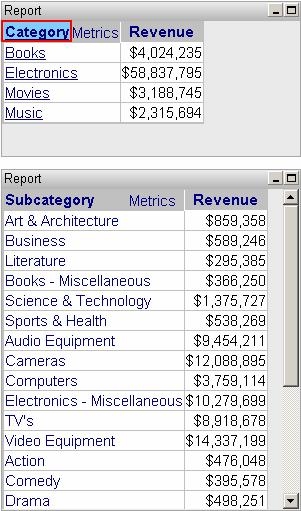
If the Category name is clicked in the grid, all the elements under Subcategory will display, as shown below:
ka04W000000OacZQAS_0EM4400000028cu.jpeg

Article Reference Number: 
KB6435


Comment

0 comments

Details

Knowledge Article

Published:

June 26, 2017

Last Updated:

December 30, 2018