EducationSoftwareStrategy.com
StrategyCommunity

Knowledge Base

Product

Community

Knowledge Base

TopicsBrowse ArticlesDeveloper Zone

Product

Download SoftwareProduct DocumentationSecurity Hub

Education

Tutorial VideosSolution GalleryEducation courses

Community

GuidelinesGrandmastersEvents
x_social-icon_white.svglinkedin_social-icon_white.svg
Strategy logoCommunity

© Strategy Inc. All Rights Reserved.

LegalTerms of UsePrivacy Policy
  1. Home
  2. Topics

KB6656: After modifying the preference 'Dynamic HTML' in MicroStrategy Web 10.x the setting goes back to 'No'.


Community Admin

• Strategy


This article explains why after modifying the preference 'Dynamic HTML' in MicroStrategy Web 10.x the setting goes back to 'No'.

SYMPTOM:
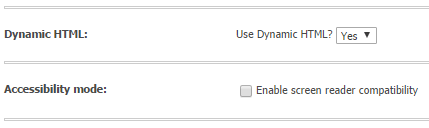
In Strategy Web when users try to modify the option to use Dynamic Hyper Text Markup Language (HTML) as shown below, after clicking on the 'Apply' button the setting goes back to 'No'.
ka04W000000OgN7QAK_0EM440000002QUU.png

CAUSE:
This issue occurs when the Accessibility Mode (see picture above) is enabled. This option does not allow Dynamic HTML to be used.
ACTION:
To use Dynamic HTML, users must disable the screen reader compatibility.


Comment

0 comments

Details

Knowledge Article

Published:

June 14, 2017

Last Updated:

June 14, 2017