Users want to create a filter that always filters on this month, i.e., the report always contains a clause such as 'WHERE MONTH_ID = 200107', for the current month. For this example, MONTH_ID is in the format YYYYMM.
This can be accomplished using custom filtering and database-specific functions. This example uses a Microsoft SQL Server warehouse.
The filter is defined as a Custom expression on Month ID, using the following expression:
ApplySimple("convert(char(6), getdate(), 112)",0)
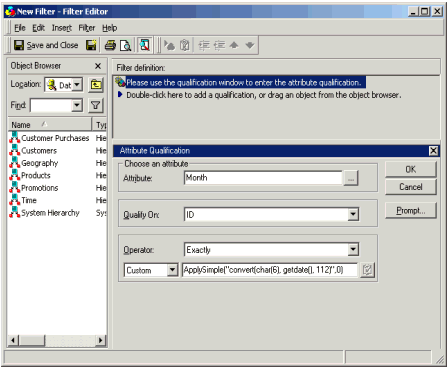
This uses the SQL Server getdate() function to return the current date, then uses the SQL Server convert() function to convert that date into CHAR datatype, in the YYYYMM format. So, this filter always compares MONTH_ID with the custom expression (which always resolves to this month):
select a11.CATEGORY_ID CATEGORY_ID,
max(a12.CATEGORY_DESC) CATEGORY_DESC,
sum(a11.TOT_DOLLAR_SALES) DOLLARSALES
from MNTH_CATEGORY_SLS a11
join LU_CATEGORY a12
on (a11.CATEGORY_ID = a12.CATEGORY_ID)
where a11.month_id = convert(char(6), getdate(), 112)
group by a11.CATEGORY_ID
which is (for July 2001) equivalent to:
where a11.month_id = `200107`
Notice that the filtering is done at the month level, and that using this method users are able to take advantage of the MNTH_CATEGORY_SLS aggregate table.
For databases other than Microsoft SQL Server the syntax will be different, but most database systems will allow the use of functions to get results such as this.
If the desired filter is not for this month, but the previous month, users can define the expression as:
ApplySimple( "convert(char(6), dateadd(mm, -1, getdate()), 112)",0 )
This subtracts one month from the date before converting it to datetime. This is the preferred way of adding and subtracting dates, as it avoids the 'year-end problem' (e.g., subtracting 1 from '200101', results in '200100', an invalid month). The above custom syntax would always filter on 'previous month' (for this example, it resolves to '200106').
