EducationSoftwareStrategy.com
StrategyCommunity

Knowledge Base

Product

Community

Knowledge Base

TopicsBrowse ArticlesDeveloper Zone

Product

Download SoftwareProduct DocumentationSecurity Hub

Education

Tutorial VideosSolution GalleryEducation courses

Community

GuidelinesGrandmastersEvents
x_social-icon_white.svglinkedin_social-icon_white.svg
Strategy logoCommunity

© Strategy Inc. All Rights Reserved.

LegalTerms of UsePrivacy Policy
  1. Home
  2. Topics

KB6977: Error: "The connection to the project has been lost or the administrator has logged you out of the project" when updating schema in a 3-tier mode connection using MicroStrategy Intelligence Server 9.x


Stefan Zepeda

Salesforce Solutions Architect • Strategy


Error when updating schema in 3-tier

 
SYMPTOM:
In Strategy Intelligence Server, when users update the schema, the updating process hangs and users see the following error message:
'The connection to the project has been lost or the administrator has logged you out of the project. All the open windows for this project will be closed'
 
This issue only occurs with a 3-tier mode connection.
 
CAUSE:
When the Strategy Intelligence Server accesses the metadata to update the schema, it takes into account the value defined for the Connection Timeout Setting because it must inform the Client application that the Strategy Intelligence Server is still working on the schema update. As a result, the Client connection may be lost to the Strategy Intelligence Server.
 
ACTION:
To correct this issue, users can increase the value in the Connection Timeout Setting by following the steps below:
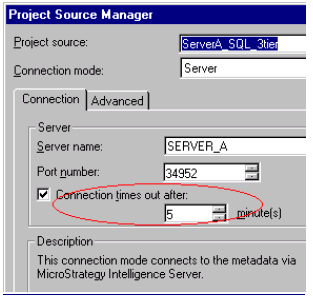
  1. Right-click on the Project Source and select 'Modify Project Source'.
  2. Increase the 'Connection timeout setting'.
ka02R000000kbmnQAA_0EM440000002GAw.gif


Comment

0 comments

Details

Knowledge Article

Published:

June 8, 2017

Last Updated:

June 8, 2017