EducationSoftwareStrategy.com
StrategyCommunity

Knowledge Base

Product

Community

Knowledge Base

TopicsBrowse ArticlesDeveloper Zone

Product

Download SoftwareProduct DocumentationSecurity Hub

Education

Tutorial VideosSolution GalleryEducation courses

Community

GuidelinesGrandmastersEvents
x_social-icon_white.svglinkedin_social-icon_white.svg
Strategy logoCommunity

© Strategy Inc. All Rights Reserved.

LegalTerms of UsePrivacy Policy
  1. Home
  2. Topics

KB7137: How to create and use the Moving Average function in MicroStrategy Developer 10.x


Stefan Zepeda

Salesforce Solutions Architect • Strategy


KB7137: How to create and use the Moving Average function in MicroStrategy Developer 10.x

 
Moving Average:
Information Returned: The cumulative group or moving average of a value expression. The return content is a function of how AVG data is aggregated.
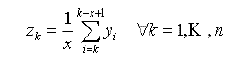
ka02R000000kc0nQAA_0EM440000002GAN.gif

 
where Y is the column value, i is the row number and x is the window size.
 
In Strategy Desktop, this function can be used in a metric with the following format:
MovingAvg <Breakby> <Sortby> (ValueList, WindowSize)
 
where ValueList is the Column, and WindowSize is the span over which the average is taken.
 
EXAMPLE:
To calculate the Moving Average for Dollar Sales over the past three months, follow the steps below:
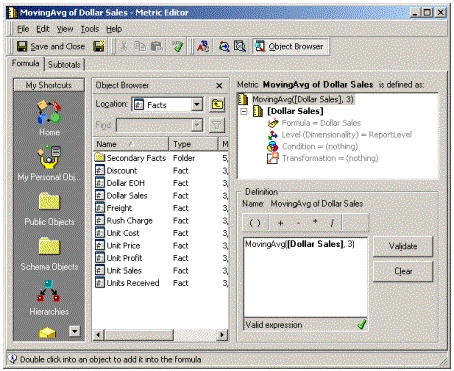
  • Create a metric defined as MovingAvg(,3).
ka02R000000kc0nQAA_0EM440000002GAc.gif
  • Put Month, Dollar Sales and the Moving Average Metric on a new Report.
ka02R000000kc0nQAA_0EM440000002GAS.gif
  •  
    Notice that the values for the MovingAvg metric are not what is expected. That is, because the MovingAvg was calculated for a data set that was sorted in an Ascending order according to Dollar Sales. To get the results expected, the function must know how to sort the data before performing the calculations.
     
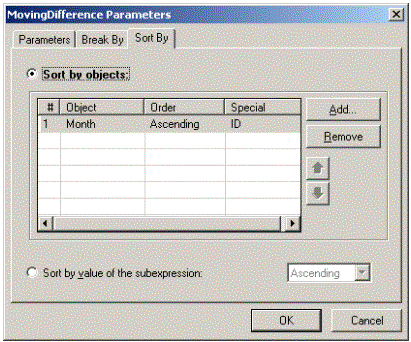
  • Set the Sort parameter for the metric so that data make sense when displayed. In the metric editor, highlight the MovingAvg function and right-click. Chose the parameters option and add Month to the 'SortBy' tab.
ka02R000000kc0nQAA_0EM440000002GAP.gif
  •  
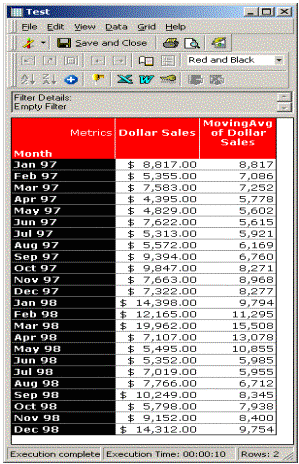
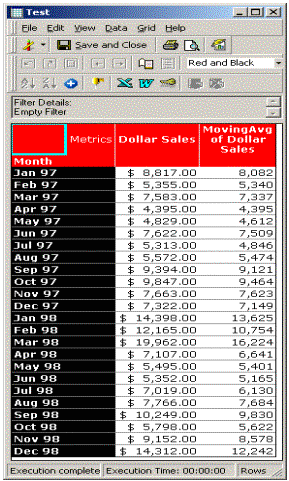
    Now, when the report is run, the Moving Average is calculated for a data set that is identical to the report that is displayed.
ka02R000000kc0nQAA_0EM440000002GAL.gif
  •  
    Notice that, for each month, the Average is calculated using the current value and the two previous month values.

Comment

0 comments

Details

Knowledge Article

Published:

June 1, 2017

Last Updated:

June 1, 2017