EducationSoftwareStrategy.com
StrategyCommunity

Knowledge Base

Product

Community

Knowledge Base

TopicsBrowse ArticlesDeveloper Zone

Product

Download SoftwareProduct DocumentationSecurity Hub

Education

Tutorial VideosSolution GalleryEducation courses

Community

GuidelinesGrandmastersEvents
x_social-icon_white.svglinkedin_social-icon_white.svg
Strategy logoCommunity

© Strategy Inc. All Rights Reserved.

LegalTerms of UsePrivacy Policy
  1. Home
  2. Topics

KB7294: How security filters work in MicroStrategy SQL Generation Engine


Stefan Zepeda

Salesforce Solutions Architect • Strategy


This article notes how security filters work in MicroStrategy

In Strategy SQL Generation Engine, security filters prevent users from seeing certain data in the database. If two users with different security filters run the same report, they may get different results.
 
Within a project, a security filter may be specified for any user. Whenever users submit an element browse request or a report execution request, the security filter is applied.
A security filter contains the following parts:

  • Filter expression: specifies the subset of the data that a user can analyze.
  • Top range attribute: specifies the highest possible level of aggregation for a metric's dimensionality.
  • Bottom range attribute: specifies the lowest possible level of aggregation for a metric's dimensionality.

 
Basic Example:
 
The examples used in this document have been created in the Strategy Tutorial installed with Strategy SQL Generation Engine.
 
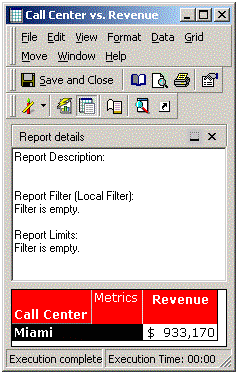
A new user called Miami Manager is created with a security filter on CallCenter = Miami.
 
Running a report Call Center versus Revenue would return only Miami data if the Miami Manager is logged in:
ka0PW0000002xVRYAY_0EM440000002GAB.gif

 
The security filter is always applied although it is not defined in the report:
select a11.[CALL_CTR_ID] AS CALL_CTR_ID, 
  max(a12.[CENTER_NAME]) AS CENTER_NAME, 
  sum(a11.[TOT_DOLLAR_SALES]) as WJXBFS1 
from [CITY_CTR_SLS] a11, 
  [LU_CALL_CTR] a12 
where a11.[CALL_CTR_ID] = a12.[CALL_CTR_ID] 
and a11.[CALL_CTR_ID] in (7) 
group by a11.[CALL_CTR_ID] 
 
Leverage Dimensionality in metrics for Security Filter users:
 
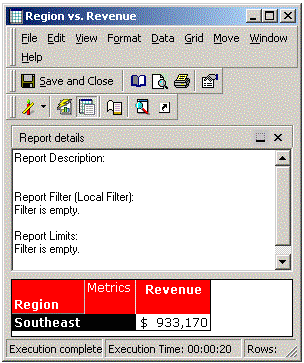
The security filter will apply on any level of data. Subsequently, a report Region vs. Revenue would return the same Metric values as mentioned above:
ka0PW0000002xVRYAY_0EM440000002GA1.gif

 
This time, the Strategy SQL Generation Engine groups by Region. But, as the security filter is applied, the results are the same as for Calling Center which is, in fact, the child attribute of Region:
select a12.[REGION_ID] AS REGION_ID, 
  max(a13.[REGION_NAME]) AS REGION_NAME, 
  sum(a11.[TOT_DOLLAR_SALES]) as WJXBFS1 
from [CITY_CTR_SLS] a11, 
  [LU_CALL_CTR] a12, 
  [LU_REGION] a13 
where a11.[CALL_CTR_ID] = a12.[CALL_CTR_ID] and 
  a12.[REGION_ID] = a13.[REGION_ID] 
and a11.[CALL_CTR_ID] in (7) 
group by a12.[REGION_ID] 
 
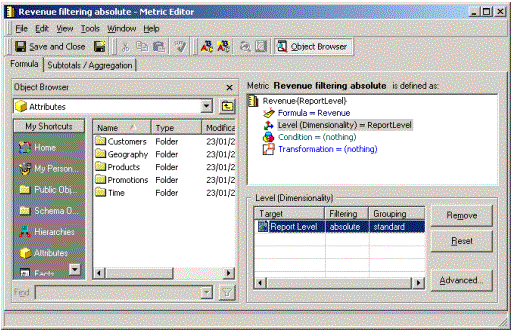
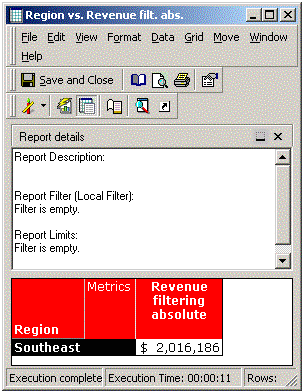
To make sure that the security filter attribute is also leveraged at a higher level, filtering absolute in the metric dimensionality has to be defined. Filtering absolute raises the level of the filter to the target attribute defined in the metric dimensionality. In this case, the target attribute will be resolved at report level:
ka0PW0000002xVRYAY_0EM440000002GA7.gif
ka0PW0000002xVRYAY_0EM440000002GA9.gif

 
This report returns the proper results for Region Southeast because the security filter has been raised to region level as shown in the SQL below:
select a12.[REGION_ID] AS REGION_ID, 
  max(a13.[REGION_NAME]) AS REGION_NAME, 
  sum(a11.[TOT_DOLLAR_SALES]) as WJXBFS1 
from [CITY_CTR_SLS] a11, 
  [LU_CALL_CTR] a12, 
  [LU_REGION] a13 
where a11.[CALL_CTR_ID] = a12.[CALL_CTR_ID] and 
  a12.[REGION_ID] = a13.[REGION_ID] 
and ((a12.[REGION_ID]) 
in (select s21.[REGION_ID] 
  from [LU_CALL_CTR] s21 
  where s21.[CALL_CTR_ID] in (7))) 
group by a12.[REGION_ID] 
 
To get data for a lower level attribute such as Employee, standard filtering can be used as the attribute level of the filter does not need to be raised because the data is aggregated on a lower level:
select a11.[EMP_ID] AS EMP_ID, 
  max(a12.[EMP_LAST_NAME]) AS EMP_LAST_NAME, 
  max(a12.[EMP_FIRST_NAME]) AS EMP_FIRST_NAME, 
  sum(a11.[TOT_DOLLAR_SALES]) as WJXBFS1 
from [ITEM_EMP_SLS] a11, 
  [LU_EMPLOYEE] a12 
where a11.[EMP_ID] = a12.[EMP_ID] 
and a12.[CALL_CTR_ID] in (7) 
group by a11.[EMP_ID] 
 
How to avoid a user having changed the dimensionality of a report:
 
Using the previous example, it is indeed possible for users to raise and lower the dimensionality of their security filter. There may be some business cases where this should be avoided. This is possible in Strategy SQL Generation Engine.
 

  • Top range attributes:
    Top range attributes specify the highest possible level of aggregation for a metric's dimensionality. For example, users cannot aggregate higher than the attribute level specified.
     
    The top range attribute has to be defined together with the security filter by the administrator in the project configuration editor.
     
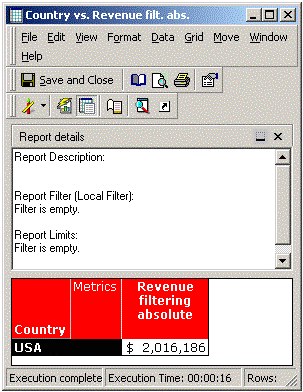
    Considering a top range attribute on Region and trying to aggregate on the higher Country level produce the following:
ka0PW0000002xVRYAY_0EM440000002G9y.gif
  •  
    Again, the metric dimensionality on report level is used with filtering absolute to raise the level of the security filter. The results, however, are the same as on Region level. The cause is the defined Top range attribute on Region level and the generated SQL filters by the appropriate region.
    select a12.[COUNTRY_ID] AS COUNTRY_ID,  max(a13.[COUNTRY_NAME]) AS COUNTRY_NAME, 
      sum(a11.[TOT_DOLLAR_SALES]) as WJXBFS1 
    from [CITY_CTR_SLS] a11, 
      [LU_CALL_CTR] a12, 
      [LU_COUNTRY] a13 
    where a11.[CALL_CTR_ID] = a12.[CALL_CTR_ID] and 
      a12.[COUNTRY_ID] = a13.[COUNTRY_ID] 
    and ((a12.[REGION_ID]) 
    in (select s21.[REGION_ID] 
      from [LU_CALL_CTR] s21 
      where s21.[CALL_CTR_ID] in (7))) 
    group by a12.[COUNTRY_ID] 
     
  • Bottom range attributes:
    It specifies the lowest possible level of aggregation for a metric's dimensionality. For example, users cannot aggregate lower than the attribute level specified.
     
    The bottom range attribute has to be defined together with the security filter by the administrator in the project configuration editor.
     
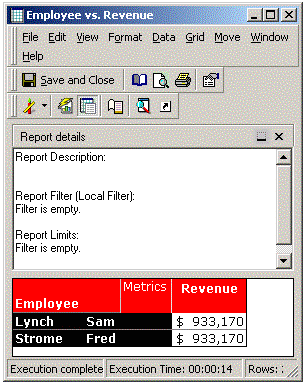
    Considering a bottom range attribute on Call Center and trying to aggregate on the lower Employee level produce the following:
ka0PW0000002xVRYAY_0EM440000002GAI.gif
  •  
    This report does not return the revenue of each employee but the revenue of their calling center due to the limitation in the bottom range attribute.
     
    The Strategy SQL Generation Engine has to generate three SQL passes. The first creates a temp table for Call Center ID's and their corresponding aggregated data. The second retrieves all Call Center ID's and data that match with the security filter at the lowest possible level (defined in Bottom range attribute). The third puts the results together to display employee description but take the data from the calling center level.
    create table ZZTIP00DRIHMD000 ( 
      CALL_CTR_ID BYTE, 
      WJXBFS1 DOUBLE) 

    insert into ZZTIP00DRIHMD000 
    select a11.[CALL_CTR_ID] AS CALL_CTR_ID, 
      sum(a11.[TOT_DOLLAR_SALES]) as WJXBFS1 
    from [CITY_CTR_SLS] a11 
    where a11.[CALL_CTR_ID] in (7) 
    group by a11.[CALL_CTR_ID] 

    select a11.[EMP_ID] AS EMP_ID, 
      a11.[EMP_LAST_NAME] AS EMP_LAST_NAME, 
      a11.[EMP_FIRST_NAME] AS EMP_FIRST_NAME, 
      pa1.[WJXBFS1] as WJXBFS1 
    from [ZZTIP00DRIHMD000] pa1, 
      [LU_EMPLOYEE] a11 
    where pa1.[CALL_CTR_ID] = a11.[CALL_CTR_ID] 

    drop table ZZTIP00DRIHMD000 

 
Limits of Security Filter:
 
Having the enhanced security benefit causes also some limitations in how to use security filter:
 

  • Dimensionality can only be raised using filtering absolute in the metric when a security filter applies.
    This is already discussed in the examples above. Users who have a security filter applied need to use 'filtering = absolute' if they want to raise a metric's dimensionality. Users who do not have any security filter applied can raise dimensionality with both 'filtering = absolute' or 'filtering = standard'. This behavior is due to the fact that the security filter is applied to every SQL pass. Subsequently, users with security filters have to leverage the security filter in every metric where they want to raise dimensionality.
     
  • Cannot create metric with all dimensionality for users with security filter applied unless an absolute highest level attribute is defined in the warehouse.
    Due to the design of security filter, SQL passes that can ignore the security filter are not wanted.
     
    Normally an administrator would have two approaches to create all dimensionality metrics:
     
    • Defining the metric dimensionality with the affected hierarchy as target, filtering: ignore, grouping: None
    • Defining an attribute 'AllGeography' that refers to a table with a single row which aggregates all the data of the geography dimension.
  •  
    The first approach will not work for users having a security filter due to the fact that security filter dimensionality can only be raised when filtering is set to absolute.
     
    The second approach would also work with security filters if the metric dimensionality is set to target: 'AllGeography', filtering: absolute, grouping: standard
     
  • Security Filter cannot be ignored:
    There is no way to ignore a security filter under any circumstances. A security filter will always be applied to every SQL pass. A user would need a second Strategy login to run reports without having the security filter applied.

Comment

0 comments

Details

Knowledge Article

Published:

June 6, 2017

Last Updated:

August 12, 2024