What is Memory Contract Manager (MCM)?
MicroStrategy Intelligence Server has a preventive mechanism in the form of memory job throttling which forces the MicroStrategy Intelligence Server to stop taking new requests from MicroStrategy Web clients until the memory usage by the MicroStrategy Intelligence Server process goes back down to the preset limits. When in this state, administrators are still able to log in using MicroStrategy Desktop and can terminate some of the jobs that are using too much memory. However, administrators may have difficulty identifying which job to terminate because there may already be some requests executing in the MicroStrategy Intelligence Server before the throttling state is reached. Thus, it was decided to implement a memory management mechanism for MicroStrategy Intelligence Server at a more granular or request level. This is the Memory Contract Manager (MCM).Prior to MCM, various components would forward their memory requests to the MicroStrategy Intelligence Server kernel; which would in turn, delegate these requests to the Windows kernel directly. The MCM is a consolidated memory management component within MicroStrategy Intelligence Server that grants or denies memory from different tasks within MicroStrategy Intelligence Server. It should be noted that jobs or requests (e.g., report execution, element browsing, metadata browsing) usually involves several tasks. These tasks have been classified as either bounded or unbounded. Unfortunately, this approach would allow any user request to allocate the memory needed and the MicroStrategy Intelligence Server would shut itself down whenever any memory limit was violated to avoid further harmful interaction with the operating system.
Bounded tasks' memory requirements are usually insignificant compared to those of unbounded tasks. The MCM governs all the tasks whose memory usage may be unbounded within the MicroStrategy Intelligence Server. Each task is handled in a First-In-First-Out (FIFO) basis. If a governed task is denied memory, the entire request/job of which it is a member is denied.
Examples of task governed by the MCM:
Examples of task not governed by the MCM:
Note: The MCM is designed to protect MicroStrategy Intelligence Server in cases where a request will cause the system to approach a state of memory depletion, and not to manage the actual memory used by MicroStrategy Intelligence Server itself. It is possible that if MicroStrategy Intelligence Server is operating on a machine with insufficient resources, the MCM could quickly begin to deny requests. This situation would give the impression that large unbounded requests were being submitted; when in reality the MCM is preventing memory depletion issues due to insufficient memory resources. Before going into some examples of how the MCM determines when requests will be denied, the following section provides brief explanation on memory depletion.
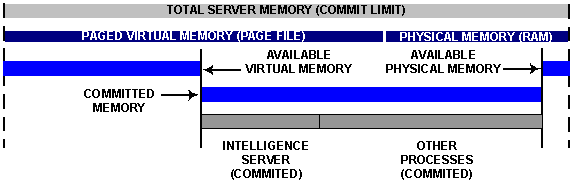
Virtual memory:Virtual memory consists of the physical memory (RAM) on the machine and the system page file. When a machine runs out of virtual memory, processes on the machine are no longer able to process instructions.
As a process on the server needs memory, it commits pages of the virtual memory for its own use. Once a process has committed a page of memory it cannot be shared with other processes. When memory is committed, physical pages of memory are allocated and space is reserved in the pagefile. Thus, it is not possible to predict where the OS will allocate the next page of committed memory; it is possible that a part or all of the memory will not reside on the physical RAM initially when committing a block of memory. The commit limit is the maximum amount of virtual memory that can be committed on a machine.
Virtual Address Space:Windows 32-bit Operating systems (OS) define a flat 32-bit virtual address map giving each application 4GB of virtual address space. However, all the applications share this space with the kernel using a 2GB-2GB divide. Thus, the OS assigns the low 2GB (addresses ranging from 0-2GB) of the address space, sometimes called the 'user space', for direct access by the application. At the same time, the OS reserves the high 2GB of the address space, sometimes called the 'kernel space', for its use without giving applications direct access to it. Depletions can occur when more user address space is requested but not available due to OS limits.
This is no longer a limitation with 64-bit operating systems as they can address close to 16 exabytes.
The pages within a process' address space can be found in one of three states within the Windows operating system:
State | Description |
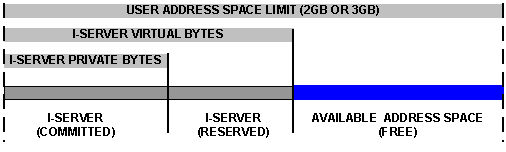
Committed | Committed represents virtual address space pages which physical storage (in memory or on disk) has been allocated. A process' committed memory is also called private bytes. |
Reserved | Reserved pages have been set aside for future use. The process cannot access a reserved page until it is committed, and there is no physical storage associated with it. The combination of reserved and committed address space is a process' virtual bytes. |
Free | Free pages of address space are available to be committed or reserved. |
The private bytes and the virtual bytes for a process can be monitored using Microsoft Performance Monitor. The following depicts the virtual memory address states:
Note: Keep in mind that jobs do not only refer to report executions but to any user action that requires processing by the MicroStrategy Intelligence Server.
After a task requests for a contract, it will provide the MCM with an estimate of how much memory is required for this new task. When memory is granted, the MCM updates its available memory (Contract List) and available memory decreases. After the task is complete or cancelled, the available memory is released. At this stage, the operations of the MCM are straightforward; however, once the available memory reaches a critical level and memory depletion may occur, additional processes kick in.
Note: MCM does not do memory allocations on behalf of the tasks from OS but only grants the component the privilege to allocate the amount of memory the component is asking for. The tasks allocate memory from the OS after receiving the grant.
Note: The MCM is active whenever it is enabled, even if the reserved memory is set to 0 MB. In this configuration, the MCM still monitors the amount of memory used and contracted to ensure memory depletion does not occur. To improve efficiency, the MCM will check for potential memory depletion every 10th request or any request over 10 MB.
There are two potential memory depletion situations:
If one of the above conditions is met, the MicroStrategy Intelligence Server enters the memory request idle mode. While in memory request idle mode, all requests for memory will be denied unless they meet memory requirements. All jobs denied memory would be canceled.
To calculate the available memory for a new memory request, the MicroStrategy Intelligence Server will calculate a value called the High Watermark (HWM) for both virtual memory and virtual bytes (if it has exceeded an acceptable level). The high watermark represents the highest value that the sum of private bytes and outstanding memory contracts may reach before triggering memory request idle mode.
The Low Watermark (LWM) will be set as 95 percent of the high watermark. Anytime the MicroStrategy Intelligence Server is in memory request idle mode, private bytes will need to fall below the low watermark before accepting memory requests. The virtual memory high watermark is recalculated each time potential memory depletion cases are encountered. The virtual byte high watermark is calculated the first time virtual bytes has exceed an acceptable level and not recalculated.
During the Request Idle Mode, if the Memory Request Idle Time is reached and all requests have not yet met requirements and the next request, if it also exceeds requirements, will trigger MicroStrategy Intelligence Server to shut down and restart.
By default, the Memory Request Idle Time is five minutes. An idle time value of -1 will result in MicroStrategy Intelligence Server waiting indefinitely for requests to be submitted under the low water mark.
Note: The request idle time is not enforced via an internal clock or scheduler. MCM checks whether the condition to fall out of the request idle mode is met every 10th request or with every request greater than 10MB. If such a condition is not met at this check, MCM checks for how much time has passed since the request idle mode was triggered. If this time is more than the request idle time setting, then a restart is issued. This helps eliminate unnecessary restarts in situations as the following. Supposing that the request idle time is set to five minute, one request causes the request idle mode to be triggered but no more requests are submitted for quite a while, if there was a scheduled check and the request idle mode was not recovered at the fifth minute, the MicroStrategy Intelligence Server would have been started unnecessarily.
MicroStrategy OnlyAlthough the MCM should help avoid the vast majority of memory depletion issues, there are possible error scenarios that may still trigger memory depletions. Possible scenarios include: Errors in the bounded and ungoverned tasks which in turn request for incorrect amounts of memory and errors in the unbounded and governed task after the MCM grants the memory contract and before the task actually requests for it from the OS.
