EducationSoftwareStrategy.com
StrategyCommunity

Knowledge Base

Product

Community

Knowledge Base

TopicsBrowse ArticlesDeveloper Zone

Product

Download SoftwareProduct DocumentationSecurity Hub

Education

Tutorial VideosSolution GalleryEducation courses

Community

GuidelinesGrandmastersEvents
x_social-icon_white.svglinkedin_social-icon_white.svg
Strategy logoCommunity

© Strategy Inc. All Rights Reserved.

LegalTerms of UsePrivacy Policy
  1. Home
  2. Topics

KB7304: How to create a Connection Map using MicroStrategy Command Manager 9.4.x-10.x?


Community Admin

• Strategy


This knowledge base article explains how to create a Connection Map using MicroStrategy Command Manager 9.4.x-10.x.

A Connection Map in Strategy is a link between a Strategy user, a database connection and a database login. It is used to apply database (row-level) security to a Strategy user.
This document explains how to create a Connection Map (create user, dblogin and connection map) in Strategy Command Manager 9.4.x-10.x.
 
For this example, assume that the DBInstance and the DBConnection are already created.
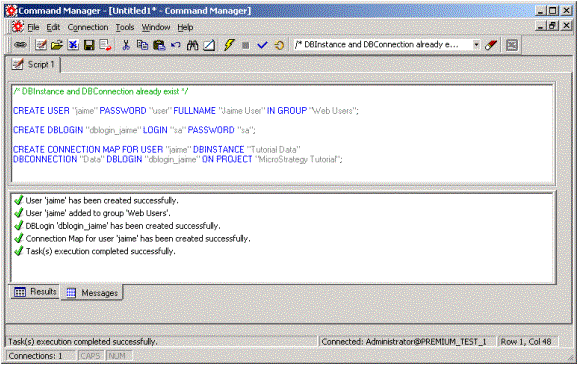
  1. Open Strategy Administrator - Command Manager and log into a 3-tier mode project source.
  2. Create a user as shown below:
    CREATE USER "jaime" PASSWORD "user" FULLNAME "jaime User" IN GROUP "Web Users";
     
  3. Create a DbLogin for the user created in Step 2, as shown below:
    CREATE DBLOGIN "dblogin_ jaime" LOGIN "sa" PASSWORD "sa";
     
  4. Create the connection map for the user created in Step 2 combining the already existing DBInstance, DBConnection and the DBLogin created in Step 3, as shown below:
    CREATE CONNECTION MAP FOR USER "jaime " DBINSTANCE "Tutorial Data"
    DBCONNECTION "Data" DBLOGIN "dblogin_ jaime" ON PROJECT "Strategy Tutorial";
     
  5. Repeat steps 1 - 4 if additional users and/or connection mappings need to be created.
ka04W000000OeKFQA0_0EM440000002BvQ.gif

 
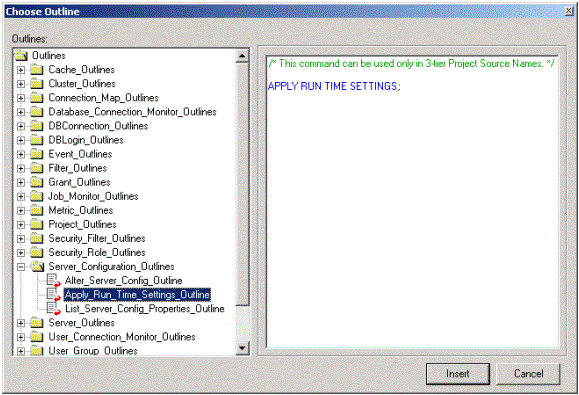
In order for the changes to take effect, either the Intelligence Server may be restarted or if it is preferred not to restar the server, the 'Apply Run Time Settings' script located under Server_Configuration_Outlines can be run.
ka04W000000OeKFQA0_0EM440000002BvT.gif

Comment

0 comments

Details

Knowledge Article

Published:

June 12, 2017

Last Updated:

June 12, 2017