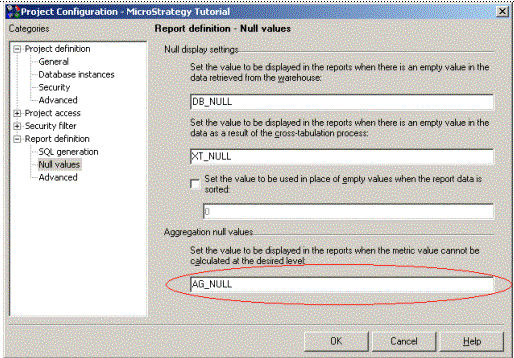
Aggregation NULLs occur whenever users make a report manipulation and the Analytical Engine does not have the necessary data to recalculate one or more metrics at the new level.
This concept is best illustrated by the example below:
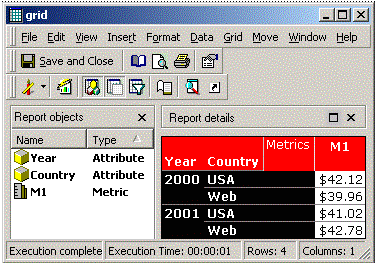
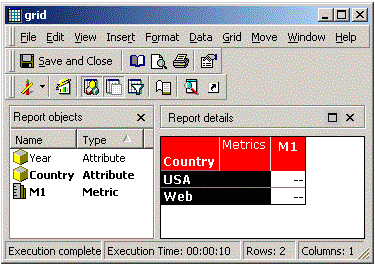
This occurs because the Analytical Engine does not have the necessary data to recalculate the metric at the Country level. The Structured Query Language (SQL) for the report shows why:
select a13.YEAR_ID YEAR_ID,
a12.COUNTRY_ID COUNTRY_ID,
max(a14.COUNTRY_NAME) COUNTRY_NAME,
(sum(a11.TOT_DOLLAR_SALES) / NULLIF(sum(a11.TOT_UNIT_SALES), 0)) WJXBFS1
from STATE_REGION_MNTH_SLS a11
join LU_REGION a12
on (a11.REGION_ID = a12.REGION_ID)
join LU_MONTH a13
on (a11.MONTH_ID = a13.MONTH_ID)
join LU_COUNTRY a14
on (a12.COUNTRY_ID = a14.COUNTRY_ID)
group by a13.YEAR_ID,
a12.COUNTRY_ID
NOTE: The metric is calculated completely in SQL (in red). Since the division operation is calculated in the SQL, the Analytical Engine does not have the base values necessary to recalculate the metric to the new (Country) level.
The generation of aggregation NULLs in this example can be avoided by using the Smart Metric functionality:
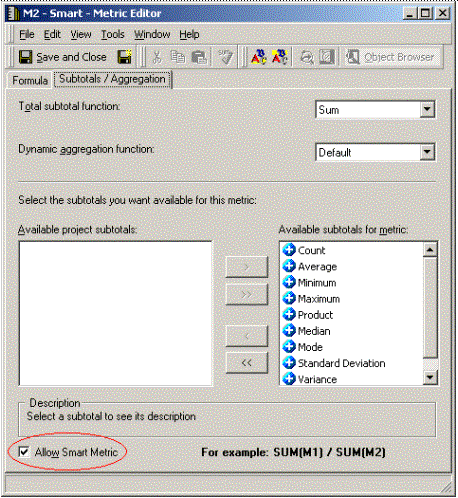
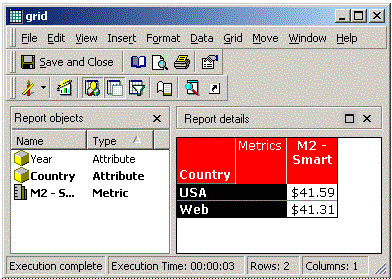
After enabling Smart Metric for the metric, the SQL now contains the base metrics instead of the calculated compound metric:
select a13.YEAR_ID YEAR_ID,
a12.COUNTRY_ID COUNTRY_ID,
max(a14.COUNTRY_NAME) COUNTRY_NAME,
sum(a11.TOT_DOLLAR_SALES) WJXBFS1,
sum(a11.TOT_UNIT_SALES) WJXBFS2
from STATE_REGION_MNTH_SLS a11
join LU_REGION a12
on (a11.REGION_ID = a12.REGION_ID)
join LU_MONTH a13
on (a11.MONTH_ID = a13.MONTH_ID)
join LU_COUNTRY a14
on (a12.COUNTRY_ID = a14.COUNTRY_ID)
group by a13.YEAR_ID,
a12.COUNTRY_ID
Since both base metrics are returned as separate columns in the SQL, the Analytical Engine does have enough data to perform the manipulation and successfully recalculates the metric at Country level.
Aggregation nulls are commonly the result of Average or Count distinct metrics. An average is, by definition, a division between a sum and a count; however, since the database returns only the average value, Smart metric functionality cannot be used to resolve the aggregation nulls. Count distinct cannot be evaluated unless the data are available to the Intelligence Server at the most granular level; thus, Count distinct metrics will also return aggregation nulls when used with dynamic aggregation.
NOTE: In this example, the symbol for Aggregation NULL is '--', which is the default. This symbol can be customized.
In Project Configuration, go to Report Definition > NULL Values. The Aggregation NULL symbol can be set there: