EducationSoftwareStrategy.com
StrategyCommunity

Knowledge Base

Product

Community

Knowledge Base

TopicsBrowse ArticlesDeveloper Zone

Product

Download SoftwareProduct DocumentationSecurity Hub

Education

Tutorial VideosSolution GalleryEducation courses

Community

GuidelinesGrandmastersEvents
x_social-icon_white.svglinkedin_social-icon_white.svg
Strategy logoCommunity

© Strategy Inc. All Rights Reserved.

LegalTerms of UsePrivacy Policy
  1. Home
  2. Topics

KB7384: How to set the default so that the attribute Totals are displayed as the first element in a page-by report in MicroStrategy Developer 9.4.1 and 10.x


Stefan Zepeda

Salesforce Solutions Architect • Strategy


How to set the default so that the attribute Totals are displayed as the first element in a page-by report in MicroStrategy Developer 9.4.1 and 10.x

The steps outlined below show how to get the Totals to be an element in the dropdown list in Strategy Developer 9.4.1 and 10.x
  1. Run the report
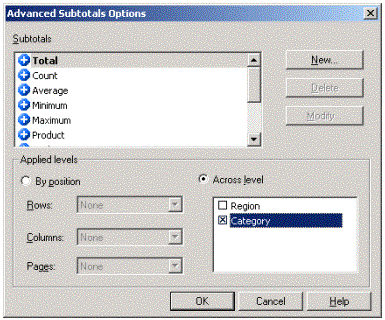
  2. Click on the 'Subtotals' button
  3. Go to 'Advanced'
  4. Go to 'Applied Level's and check the `Across Level` button.
  5. Check the option for the attribute contained in the page-by field. (e.g., Category.)
  6. Click on 'OK' twice to save the choices.
ka02R000000kW3qQAE_0EM440000002G9q.gif

 
To get the totals to be the top element of the drop-down list (i.e., the element that displays first)
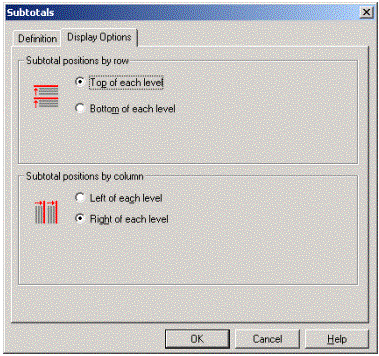
  1. Go to the `Display Options` tab in the subtotals window
  2. In `Subtotal positions by row`, users must check the box to display totals at the top of each level.
ka02R000000kW3qQAE_0EM440000002G9a.gif

 
The Totals is, then, the first element displayed in the page-by when the report is opened.

ka02R000000kW3qQAE_0EM440000002G9X.gif

Comment

0 comments

Details

Knowledge Article

Published:

May 10, 2017

Last Updated:

May 10, 2017