EducationSoftwareStrategy.com
StrategyCommunity

Knowledge Base

Product

Community

Knowledge Base

TopicsBrowse ArticlesDeveloper Zone

Product

Download SoftwareProduct DocumentationSecurity Hub

Education

Tutorial VideosSolution GalleryEducation courses

Community

GuidelinesGrandmastersEvents
x_social-icon_white.svglinkedin_social-icon_white.svg
Strategy logoCommunity

© Strategy Inc. All Rights Reserved.

LegalTerms of UsePrivacy Policy
  1. Home
  2. Topics

KB7396: How to check the Data Source Name (DSN) used by the MicroStrategy Intelligence Server


Stefan Zepeda

Salesforce Solutions Architect • Strategy


How to check the Data Source Name (DSN) used by the MicroStrategy Intelligence Server

 
To check the Data Source Name (DSN) in use by the Strategy Intelligence Server, users must perform the steps outlined below on the Intelligence Server machine:
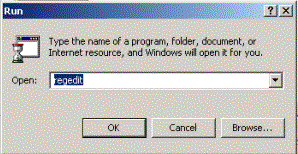
  • In MicroSoft Windows follow the menu options - Start > Run > type 'Regedit' and click on 'Enter' to open the registry editor.
ka02R000000kbzmQAA_0EM440000002G9n.gif
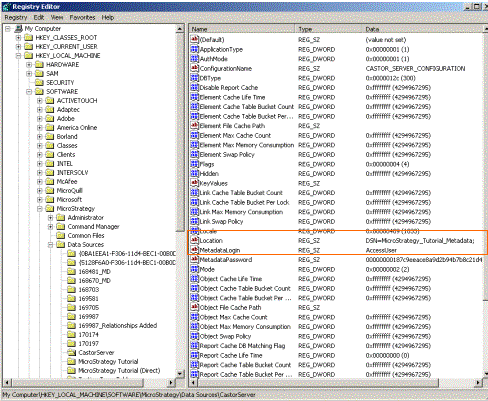
  • Within the Registry Editor go to:
    32 bits: HKEY_LOCAL_MACHINE\SOFTWARE\Strategy\Data Sources\CastorServer
    64 bits: HKEY_LOCAL_MACHINE\SOFTWARE\Wow6432Node\Strategy\Data Sources\CastorServer
     
    and look for the key called "Location" as shown below. This value for this key is the DSN used by the Intelligence Server.
ka02R000000kbzmQAA_0EM440000002G9s.gif
  • For Intelligence Server Machines running on Unix / Linux, this information can be obtained from the MSIReg.reg file present in the <mstr_home> folder. This file may be opened in a text editor to view the keys and values. Search for the string "CastorServer":

 
.
.
"Link Max Memory Consumption"=dword:ffffffff
"Link Swap Policy"=dword:ffffffff
"Locale"=dword:00000409
"Location"="DSN=TEST;"
"MDNoPassword"=dword:00000000
.
.
Registry Modification:
WARNING:
Modifying registry values incorrectly may cause serious, system-wide problems that may require the re-installation of Microsoft Windows. Any edit of the registry is done at the user's own risk. Since these are user-initiated changes, they are not covered by any Strategy warranty. If using Microsoft Windows, the user should backup the registry and/or update an Emergency Repair Disk (ERD) prior to alterations. Customers on Universal platforms should make a backup of the MSIReg.reg file before altering its contents.


Comment

0 comments

Details

Knowledge Article

Published:

June 2, 2017

Last Updated:

June 2, 2017