EducationSoftwareStrategy.com
StrategyCommunity

Knowledge Base

Product

Community

Knowledge Base

TopicsBrowse ArticlesDeveloper Zone

Product

Download SoftwareProduct DocumentationSecurity Hub

Education

Tutorial VideosSolution GalleryEducation courses

Community

GuidelinesGrandmastersEvents
x_social-icon_white.svglinkedin_social-icon_white.svg
Strategy logoCommunity

© Strategy Inc. All Rights Reserved.

LegalTerms of UsePrivacy Policy
  1. Home
  2. Topics

KB7482: How to display the number and date in a format different from the locale being used in MicroStrategy Web


Community Admin

• Strategy


This article explains how to display the number and date in a format different from the locale being used in MicroStrategy Web

 
This document explains the new setting that is incorporated in Strategy Web, which allows the use of a specific date and number format regardless of the locale being used. For example, the interface is displayed in French, yet the dates and currency could be kept in the English US format.
  • Log into Strategy Web
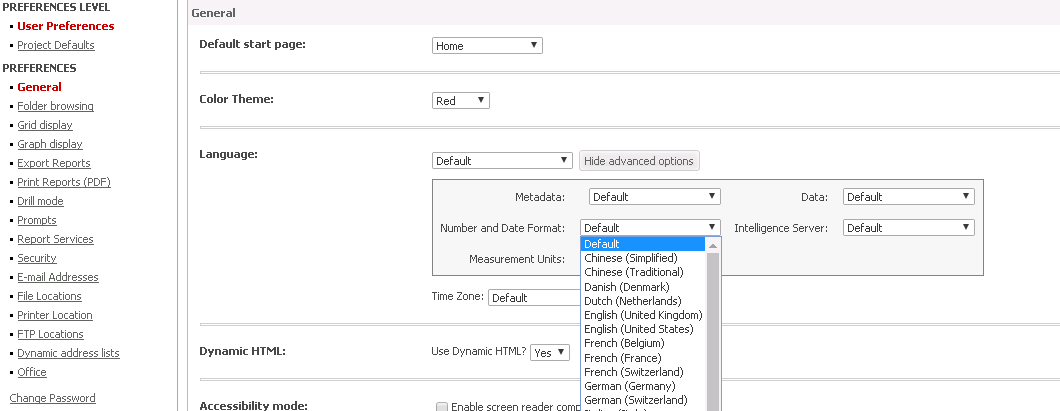
  • Access User Preferences > General > Language: > "Shwo advanced Options" and the setting 'Number and Date Format' as illustrated below:
ka04W000000OadNQAS_0EM440000002Poq.png
  • Set the 'Number and Date Format' to the desired option -- which will override the number and date formatting associated with the locale being used -- and apply the changes.
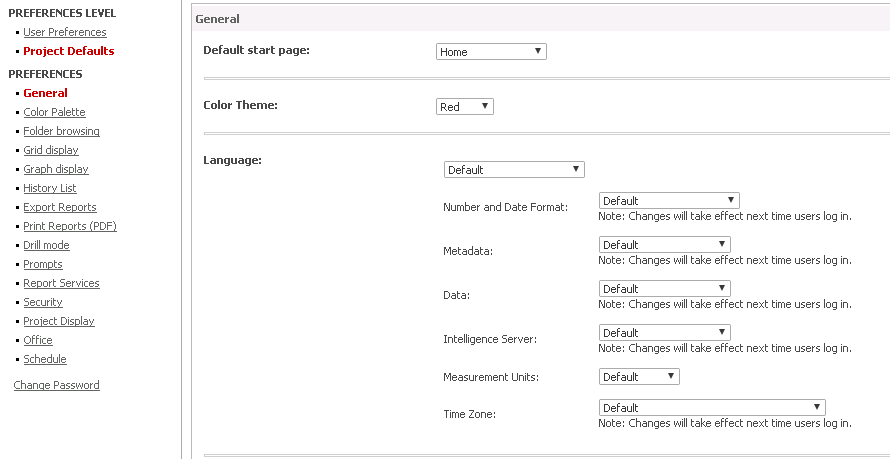
ka04W000000OadNQAS_0EM440000002Pp5.png
  • NOTE: This setting is available both at the project and user preference levels. User preference, as always, overrides the project preference.


Comment

0 comments

Details

Knowledge Article

Published:

June 13, 2017

Last Updated:

June 13, 2017