Most latest generation databases provide the same performance regardless of the order in which the tables are placed in the FROM clause SQL query. Their optimizers take care of choosing the most efficient way of performing the joins. Other databases perform differently producing a different order. This means that a database compiler may choose a different join path that can be more or less efficient.
By default, the Strategy SQL Generation Engine orders the tables in the following way:
But this behavior can be changed by using the 'From Clause Order' VLDB property under the 'Joins' folder. This setting has four values:
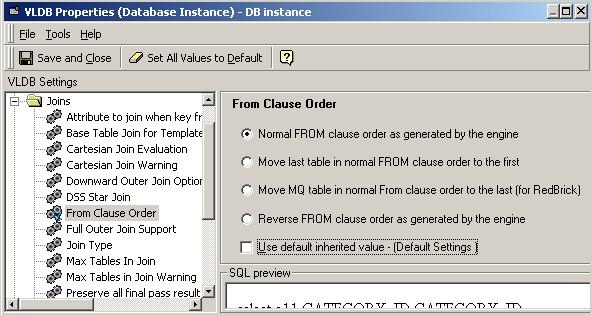
Below are the values that the setting may have:
Note: The "From Clause Order" VLDB property is intended to control syntax only, not join behavior. Report results should be the same for all values of this setting. If the report uses only inner joins, then the only thing that changes is the table order. One-sided outer joins will switch direction when the From clause order is altered.
For example, a report that performs left outer joins to lookup tables (using the "Preserve all final pass result elements" VLDB property) will generate SQL such as the following:
select a11.REGION_ID REGION_ID,
max(a14.REGION_NAME) REGION_NAME,
a12.CATEGORY_ID CATEGORY_ID,
max(a13.CATEGORY_DESC) CATEGORY_DESC,
sum(a11.TOT_DOLLAR_SALES) WJXBFS1
from STATE_SUBCATEG_REGION_SLS a11
left outer join LU_SUBCATEG a12
on (a11.SUBCAT_ID = a12.SUBCAT_ID)
left outer join LU_CATEGORY a13
on (a12.CATEGORY_ID = a13.CATEGORY_ID)
left outer join LU_REGION a14
on (a11.REGION_ID = a14.REGION_ID)
group by a11.REGION_ID,
a12.CATEGORY_ID
Moving the last table to the top of the From clause places the joins for the first three tables in parentheses. LU_REGION, formerly last, now appears first and right outer joins to the parenthesized join expression.
select a11.REGION_ID REGION_ID,
max(a14.REGION_NAME) REGION_NAME,
a12.CATEGORY_ID CATEGORY_ID,
max(a13.CATEGORY_DESC) CATEGORY_DESC,
sum(a11.TOT_DOLLAR_SALES) WJXBFS1
from LU_REGION a14
right outer join (STATE_SUBCATEG_REGION_SLS a11
left outer join LU_SUBCATEG a12
on (a11.SUBCAT_ID = a12.SUBCAT_ID)
left outer join LU_CATEGORY a13
on (a12.CATEGORY_ID = a13.CATEGORY_ID))
on (a11.REGION_ID = a14.REGION_ID)
group by a11.REGION_ID,
a12.CATEGORY_ID
Both From clauses are functionally identical. This is by design -- the intent of this property is to change the From clause order only, to fit better with a particular database platform's SQL optimizer.
If it is needed to change the behavior of outer joins, the VLDB properties pertaining to outer joins should be used:
