There are two main licensing schemes for Strategy Intelligence Server 9.x - 10.x, one based upon the number of named users and the other based upon the number of Central Processing Units (CPUs) and Clock Speed. This document details the working and enforcement of the CPU/Clock Speed licensing scheme in Strategy 9.x - 10.x. In this scheme, Strategy Intelligence Server licenses may be purchased based upon a combination of the number of CPUs and a specified Clock Speed.
Under the CPU/Clock Speed licensing scheme, Strategy Intelligence Server is limited to the number of CPUs purchased, even if the machine hosting Strategy Intelligence Server has more than this number of licensed CPUs. For example, if two CPUs have been purchased, even if a machine where Strategy Intelligence Server is installed has four CPUs, Strategy Intelligence Server will only use two CPUs on that machine.
NOTE:
By default, one CPU refers to one core processor. If it is a dual core processor or quad core processor, each core consumes one CPU license.
The Clock Speed limit applies in a similar manner. The installation routine will check the clock speed of the machine on which Strategy Intelligence Server is being installed and will abort the installation when the clock speed on the machine exceeds the licensed clock speed. The licensed values for the number of CPUs and clock speed are encoded in the CD key.
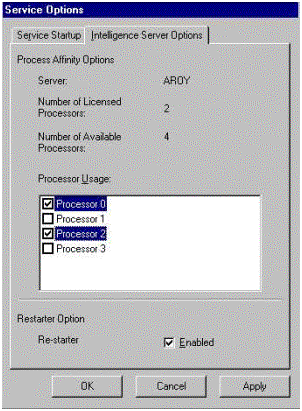
Additionally, in Strategy Intelligence Server 9.x - 10.x, users can choose the particular processors that Strategy Intelligence Server will use on the machine where it is installed. This choice can be made through Strategy Service Manager > Options > Intelligence Server Options if running the Strategy Intelligence Server under the root account.
Users can choose from the list of the available CPUs (by checking the appropriate boxes) up to the number of licensed CPUs as shown below. On this screenshot, the number of available processors on the machine is 4, the number of processors licensed is 2 and users have chosen to use Processors 0 and 2 for the Strategy Intelligence Server.
Users could have chosen any other combination of processors, for example, Processors 0 and 1, Processors 0 and 3, Processors 1 and 2, Processors 1 and 3 and Processors 2 and 3.
NOTES:
