In Strategy 9.x-10.x, there are cases in which some calculations are required not to consider the metrics values when the results of the metrics are '0' (zero).
In a report like the following:

The desired aggregation for the subtotals should ignore the zeroes:
|
|
|
|
|
|
|
|
|
|
|
|
|
|
|
|
|
|
|
|
|
|
SOLUTION:
Use the Strategy internal ZeroToNull function, located under the '//Schema Objects/Functions and Operators/Functions/Null/ Zero Functions' folder:
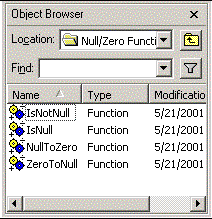
Redefine the metric from:
Sum () {~+}
To:
ZeroToNull (Sum () {~+})
When used on the report, the new metric will ignore the NULL values for subtotaling:
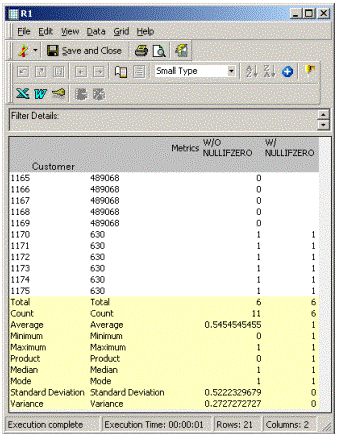
Note: It may also be necessary to set the Very Large Database (VLDB) property "Null checking for Analytical Engine" to False for the null values to be ignored in subtotals. When this VLDB property is True, the analytical engine will replace null values with the zeroes, undoing the effect of the ZeroToNull function. Thus, the property should be set to False if null values should be ignored.
