EducationSoftwareStrategy.com
StrategyCommunity

Knowledge Base

Product

Community

Knowledge Base

TopicsBrowse ArticlesDeveloper Zone

Product

Download SoftwareProduct DocumentationSecurity Hub

Education

Tutorial VideosSolution GalleryEducation courses

Community

GuidelinesGrandmastersEvents
x_social-icon_white.svglinkedin_social-icon_white.svg
Strategy logoCommunity

© Strategy Inc. All Rights Reserved.

LegalTerms of UsePrivacy Policy
  1. Home
  2. Topics

KB7672: How to remove the ’metrics’ column when exporting to Excel in MicroStrategy Developer 9.4.x-10.x


Stefan Zepeda

Salesforce Solutions Architect • Strategy


In MicroStrategy Developer, when users export to Excel, an additional column is added to the Excel spreadsheet to include the word 'Metrics'

DESCRIPTION:
In Strategy Developer, when users export to Excel, an additional column is added to the Excel spreadsheet to include the word 'Metrics' as shown below:
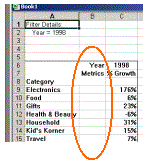
ka044000000kJdCAAU_0EM440000002G8g.gif

EXAMPLE:
The following procedure describes how to remove the 'Metrics' column when exporting to Excel:
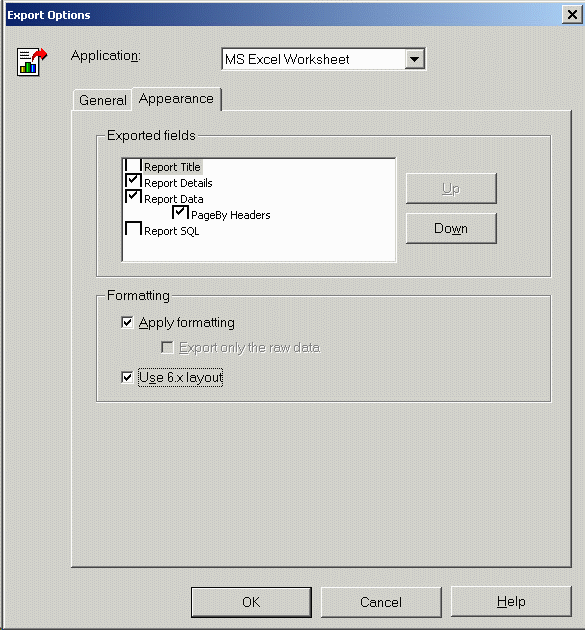
  • Within the report go to Data and Export Options.
  • Under the Appearance tab, check the 'Use 6.x layout' box and refer to the results below:
ka044000000kJdCAAU_0EM440000002G8i.gif


KB7672


Comment

0 comments

Details

Knowledge Article

Published:

April 5, 2017

Last Updated:

December 6, 2018