EducationSoftwareStrategy.com
StrategyCommunity

Knowledge Base

Product

Community

Knowledge Base

TopicsBrowse ArticlesDeveloper Zone

Product

Download SoftwareProduct DocumentationSecurity Hub

Education

Tutorial VideosSolution GalleryEducation courses

Community

GuidelinesGrandmastersEvents
x_social-icon_white.svglinkedin_social-icon_white.svg
Strategy logoCommunity

© Strategy Inc. All Rights Reserved.

LegalTerms of UsePrivacy Policy
  1. Home
  2. Topics

KB7723: How to create a list of the individual fact entries for an attribute that has a fact table as its lookup table in MicroStrategy Developer 10.x


Stefan Zepeda

Salesforce Solutions Architect • Strategy


This article explains how to create a list of the individual fact entries for an attribute that has a fact table as its lookup table in MicroStrategy Developer.

In Strategy Developer, to create a list of the individual fact entries for an attribute in a scenario where the attribute has a fact table as its lookup table Very Large Database (VLDB) 'Distinct/Group By option (when no aggregation and not table key)', users can create an attribute 'Year' that uses the YR_CATEGORY_SLS fact table in Strategy Tutorial (Vmall).
When using such attribute on its own in a report, the SQL created is the following:
select distinct a.11 As Year_Id
from a.11
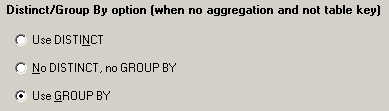
In Strategy Developer, there is a VLDB setting called 'Distinct/Group By option (when no aggregation and not table key)' at the report level (Select/Insert > Distinct/Group By option). If no aggregation is needed and the attribute defined on the table is not a primary key, it tells the engine whether to use Select Distinct, Group By or neither.
ka02R000000kVH2QAM_0EM440000002G94.jpeg

It can have three values:

  1. 'Use DISTINCT' that creates a SQL similar to the following:
    select distinct a11.ITEM_COLOR_ID ITEM_COLOR_ID,
    a11.COLOR_DESC COLOR_DESC
    from DSSADMIN.LOOKUP_COLOR a11
     
  2. No DISTINCT no GROUP BY' that creates a SQL similar to the following:
    select a11.ITEM_COLOR_ID ITEM_COLOR_ID,
    a11.COLOR_DESC COLOR_DESC
    from DSSADMIN.LOOKUP_COLOR a11
     
  3. 'Use GROUP BY' that creates a SQL similar to the following:
    select a11.ITEM_COLOR_ID ITEM_COLOR_ID,
    max(a11.COLOR_DESC) COLOR_DESC
    from DSSADMIN.LOOKUP_COLOR a11
    group by a11.ITEM_COLOR_ID
     

If it is needed to list all the entries in the fact table, it is necessary to use the second setting No DISTINCT no GROUP BY leaving the check box for 'Use default inherited value' unchecked.
7723


Comment

0 comments

Details

Knowledge Article

Published:

May 17, 2017

Last Updated:

June 8, 2018