EducationSoftwareStrategy.com
StrategyCommunity

Knowledge Base

Product

Community

Knowledge Base

TopicsBrowse ArticlesDeveloper Zone

Product

Download SoftwareProduct DocumentationSecurity Hub

Education

Tutorial VideosSolution GalleryEducation courses

Community

GuidelinesGrandmastersEvents
x_social-icon_white.svglinkedin_social-icon_white.svg
Strategy logoCommunity

© Strategy Inc. All Rights Reserved.

LegalTerms of UsePrivacy Policy
  1. Home
  2. Topics

No privileges or no projects connected error message appears when logging into MicroStrategy Web via database authentication


Jaime Perez

Vice President, Product Owner • MicroStrategy


Description

In Strategy Web, when users employ the database pass through authentication to log into the project, the following message appears:
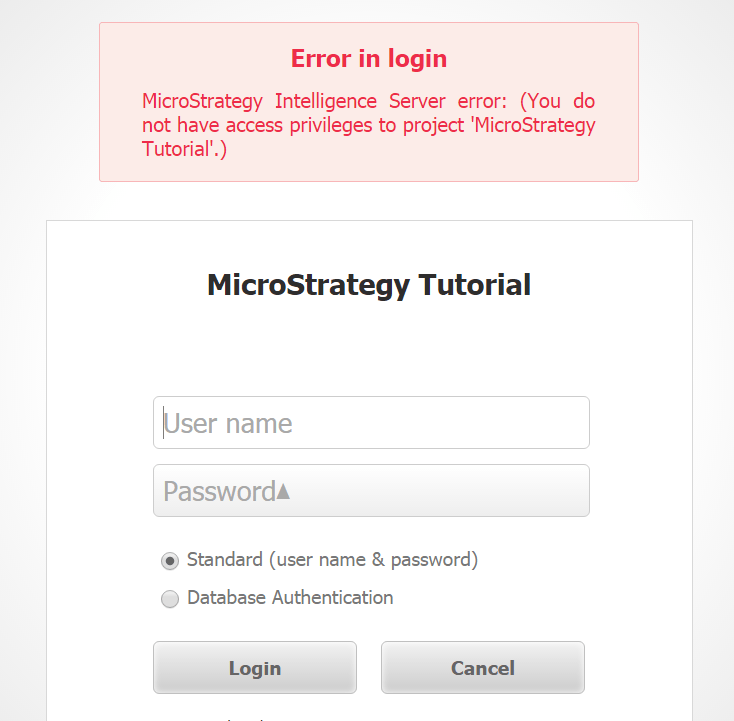
 

ka02R000000g2NQQAY_0EM440000002Hik.png

Error in login
Strategy Intelligence Server error: (You do not have access privileges to project 'Strategy Tutorial'.)
When the server is set to login first and then display accessible projects, the following error occurs:

ka02R000000g2NQQAY_0EM440000002Hip.png

There are no projects connected to this web server. To configure projects, go to the Web Administrator
 

Why is this happening?

This issue occurs because a guest account must be set up to use a Database pass through in Strategy Web.
Note: Feel free to refer to the Strategy knowledge base document KB31832 for more information.
The current account being used has been granted only the rights and privileges granted to the Everyone group in Strategy Desktop, under administration. This group must have the Web user privilege to be able to use Strategy Web at all, and also other privileges to be able to utilize all of Strategy Web functionalities.
 

Solution

To resolve this issue, users must execute the steps below:
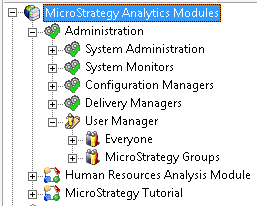
  • Log into Strategy Desktop as the administrator.
  • Expand the Administration section.
  • Expand the User Manager.
     
ka02R000000g2NQQAY_0EM440000002Hiu.png
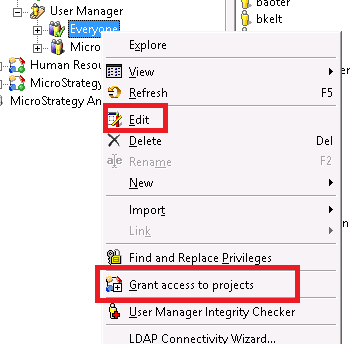
  • Right-click on the Everyone group.
  • Choose to Edit or Grant access to projects.
     
ka02R000000g2NQQAY_0EM440000002Hiz.png


  1. Grant all the privileges that the database pass through users will need for Strategy Web.

    Notice all of the changes when logging into Strategy Web through the new authentication.


    Still having trouble? Contact Strategy Technical Support or start a discussion on Community!


Comment

0 comments

Details

Knowledge Article

Published:

April 3, 2017

Last Updated:

September 4, 2019