EducationSoftwareStrategy.com
StrategyCommunity

Knowledge Base

Product

Community

Knowledge Base

TopicsBrowse ArticlesDeveloper Zone

Product

Download SoftwareProduct DocumentationSecurity Hub

Education

Tutorial VideosSolution GalleryEducation courses

Community

GuidelinesGrandmastersEvents
x_social-icon_white.svglinkedin_social-icon_white.svg
Strategy logoCommunity

© Strategy Inc. All Rights Reserved.

LegalTerms of UsePrivacy Policy
  1. Home
  2. Topics

KB7902: What is the function of a ’Default Address’ in MicroStrategy Narrowcast Server 9.x and newer


Community Admin

• Strategy


This article explains what is the function of a ’Default Address’ in MicroStrategy Narrowcast Server 9.x and newer

One of the new features of Strategy Narrowcast Server is intuitive Web reporting. The Support for delivery subscriptions from Strategy Web allows Web users to receive reports and Web documents via e-mail. For users that access this new feature or the 'Send Now' feature from Strategy Web, a Default Address has to be selected.
To specify a Default E-mail address, users must do the following:
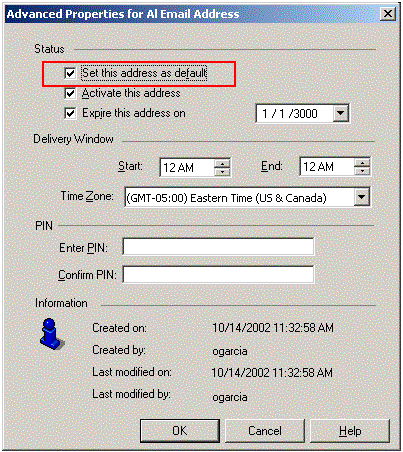
  • Open the Subscription Book
  • Double-click on a user
  • In the User Editor select the 'Address' tab.
  • From the list of addresses, highlight the preferred e-mail address.
  • Click on the 'Advanced Properties' button.
  • Check the 'Set this address as default' option.
ka04W000000OdoGQAS_0EM440000002Bud.gif

Every user must have a default address created. In case a user has multiple e-mail addresses created, the default address will appear selected by default on the 'Send Now' and 'Subscribed Email' drop down menus.
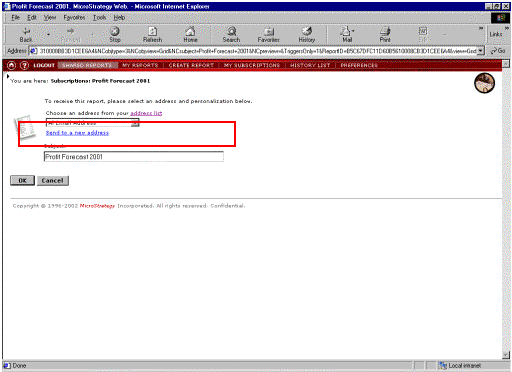
ka04W000000OdoGQAS_0EM440000002Buc.gif

Additionally, the default e-mail address can be specified in Strategy Web.

  • Log into Strategy Web.
  • Click on 'Preferences'.
  • Click on 'Address'.
  • From the list of available e-mail addresses, select the new one and click on 'Set New Default' button.
ka04W000000OdoGQAS_0EM440000002Bue.gif

Comment

0 comments

Details

Knowledge Article

Published:

June 15, 2017

Last Updated:

June 15, 2017