Normally only key attributes appear in the GROUP BY statement, where 'key' is defined as the lowest level attribute in a given hierarchy that is used on a report template or in a metric's dimensionality.
By default, if two attributes that have a 1:M relationship with each other* appear on a report together, only the lower-level attribute is used in the SELECT and GROUP BY statements for intermediate SQL passes.
(*The 1:M relationship can be either direct, or via other intermediate attributes. For example, Year is considered to be a 1:M parent of Day, even though the relationship is established as a 1:M relationship from Year to Month, then another 1:M relationship from Month to Day.)
Note: This is the same definition of 'key' by which logical table keys are determined during the Update Schema process.
For example, if a report is created with Category and Subcategory and two metrics, and both attributes are available in the fact table for the first metric, the SQL for the first intermediate pass might appear as follows:
select a12.SUBCAT_ID SUBCAT_ID,
sum((a11.QTY_SOLD * a11.DISCOUNT)) WJXBFS1
into #ZZSP00
from ORDER_DETAIL a11
join LU_ITEM a12
on (a11.ITEM_ID = a12.ITEM_ID)
group by a12.SUBCAT_ID
NOTE: Only the child attribute (SUBCAT_ID) appears in the intermediate SQL pass.
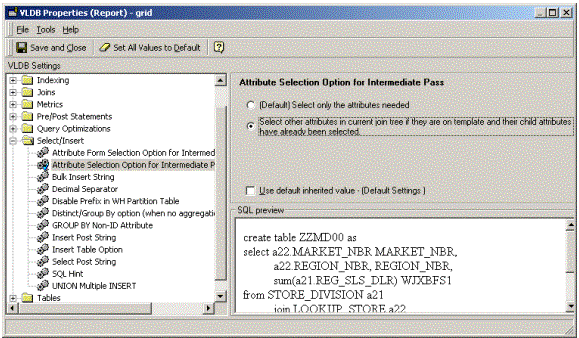
In some situations, users may want both parent and child attributes to appear in the SELECT and GROUP BY clauses of intermediate SQL passes when they are both available in the fact table. There is a VLDB setting to accomplish this. To make the change at the report level, go to Data > VLDB Properties > Select/Insert > Attribute Selection Option for Intermediate Pass, and change the setting to 'Select other attributes…':
After this change, the intermediate passes will SELECT and GROUP BY both the parent and child attributes:
select a12.SUBCAT_ID SUBCAT_ID,
a12.CATEGORY_ID CATEGORY_ID,
sum((a11.QTY_SOLD * a11.DISCOUNT)) WJXBFS1
into #ZZSP00
from ORDER_DETAIL a11
join LU_ITEM a12
on (a11.ITEM_ID = a12.ITEM_ID)
group by a12.SUBCAT_ID,
a12.CATEGORY_ID
Note: Parent attributes will be included in the intermediate passes only if their ID forms exist in one of the tables already chosen to resolve either a key attribute in the dimensionality, or a filtering attribute at any level. The Strategy SQL Generation Engine does not introduce extra tables into the FROM clause for the sole purpose of selecting parent attribute IDs. This VLDB property may not apply to all attributes in every case.
