SYMPTOM:
In Strategy Desktop versions 9.x, when users run a report against a Teradata warehouse, they see the following error message:
'Invalid DATE literal.'
This issue occurs for reports that have a date in the where clause. As the following Structured Query Language (SQL) shows, the keyword DATE is included in the condition:
from (select a12.MARKET_SEGMENT_ID MARKET_SEGMENT_ID,
from WLUP_PARTY_STATUS_DETAIL a11
join WLUP_PARTY_MASTER a12
on (a11.PARTY_ID = a12.PARTY_ID)
where (a11.PARTY_ROLE_ID in ('CUS')
and a11.PARTY_STATUS_END_DATE is null
and a11.PARTY_STATUS_EFF_DATE between DATE '2002/01/01' and DATE '2002/10/28'
If the SQL is modified and run manually through the ODBC Test Tool, the query completes successfully.
from (select a12.MARKET_SEGMENT_ID MARKET_SEGMENT_ID,
from WLUP_PARTY_STATUS_DETAIL a11
join WLUP_PARTY_MASTER a12
on (a11.PARTY_ID = a12.PARTY_ID)
where (a11.PARTY_ROLE_ID in ('CUS')
and a11.PARTY_STATUS_END_DATE is null
and a11.PARTY_STATUS_EFF_DATE between '2002/01/01' and '2002/10/28'
CAUSE:
The 'Date pattern' default value for Teradata has the 'DATE' keyword. This Very Large Database (VLDB) property is set at the database level.
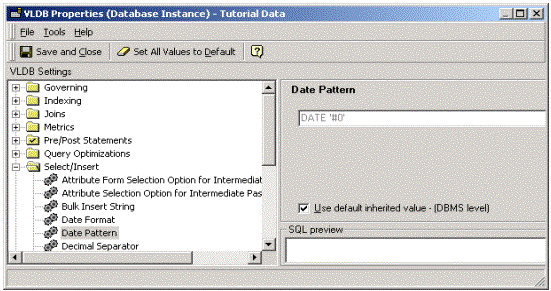
The keyword is included to avoid potential problems with the format of the date string. However, in some specific Teradata configurations, the keyword may cause the above-mentioned syntax error.
ACTION:
To resolve this issue, users must execute the steps outlined below:
After changing VLDB properties at the database instance level, any Intelligence Servers using the metadata should be restarted. Users connected through a two-tier project source should disconnect and reconnect before proceeding.
