EducationSoftwareStrategy.com
StrategyCommunity

Knowledge Base

Product

Community

Knowledge Base

TopicsBrowse ArticlesDeveloper Zone

Product

Download SoftwareProduct DocumentationSecurity Hub

Education

Tutorial VideosSolution GalleryEducation courses

Community

GuidelinesGrandmastersEvents
x_social-icon_white.svglinkedin_social-icon_white.svg
Strategy logoCommunity

© Strategy Inc. All Rights Reserved.

LegalTerms of UsePrivacy Policy
  1. Home
  2. Topics

KB8075: How is the service priority applied during the service execution in MicroStrategy Narrowcast Server?


Community Admin

• Strategy


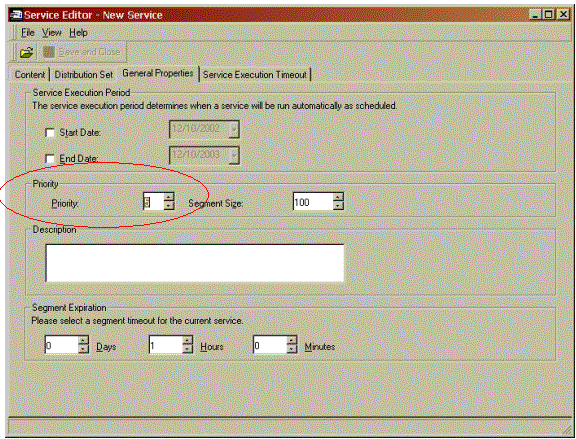
In Strategy Narrowcast Server, users can set the priority on a service through the service editor. The priority of the service varies between 0 (highest priority) and 10 (lowest priority). The default priority of a service is 5.
ka04W000000Oh04QAC_0EM440000002Buh.gif

 
The priority set on a service applies to the service's segments during execution. All the segments of a service will always have the same priority.
 
The following example shows how the priorities are applied during the execution of multiple services.
 
EXAMPLE:
For this example, there are three services: S1, S2 and S3. S1 and S2 run on Schedule1 and S3 runs on Schedule2. S1 has priority 10, S2 has priority 1 and S3 has priority 5. Only two segments can be executed at a time.

  1. Schedule1 triggers S1 and S2. Since S2 has a higher priority than S1, S2 will start to execute first and all of S2's segments will be in the segment queue above S1's segments.
     
    Segment Queue:
    • S2 - segment1 (executing)
    • S2 - segment2 (executing)
    • S2 - segment3 (queued)
    • S1 - segment1 (queued)
    • S1 - segment2 (queued)
  2. Schedule2 triggers S3. S3's segments will enter the queue. Since S3 has a higher priority than S1 but a lower priority than S2, S3's segments will take precedence over S1's segments that are queued.
     
    Segment Queue:
    • S2 - segment1 (finished)
    • S2 - segment2 (executing)
    • S2 - segment3 (executing)
    • S3 - segment1 (queued)
    • S3 - segment2 (queued)
    • S1 - segment1 (queued)
    • S1 - segment2 (queued)

 
NOTE: Only segments that are queued (not executing) will be moved either up or down in the queue depending on the priority. If a segment is already being executed. It will continue to execute until it finishes even if a segment with a higher priority enters the queue.


Comment

0 comments

Details

Knowledge Article

Published:

June 6, 2017

Last Updated:

June 6, 2017