EducationSoftwareStrategy.com
StrategyCommunity

Knowledge Base

Product

Community

Knowledge Base

TopicsBrowse ArticlesDeveloper Zone

Product

Download SoftwareProduct DocumentationSecurity Hub

Education

Tutorial VideosSolution GalleryEducation courses

Community

GuidelinesGrandmastersEvents
x_social-icon_white.svglinkedin_social-icon_white.svg
Strategy logoCommunity

© Strategy Inc. All Rights Reserved.

LegalTerms of UsePrivacy Policy
  1. Home
  2. Topics

KB8088: MicroStrategy Web 9.x attribute IDs with more than 15 numeric characters are rounded when exported to Microsoft Excel


Community Admin

• Strategy


When users export an attribute ID that has more than 15 numeric characters from MicroStrategy Web to Microsoft Excel, the attribute ID is rounded.

 
SYMPTOM:
When users export an attribute ID that has more than 15 numeric characters from Strategy Web to Microsoft Excel, the attribute ID is rounded.
 
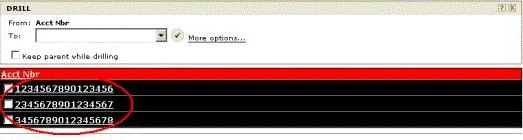
The report in Strategy Web is similar to the following:
ka04W000001482fQAA_0EM44000000295g.jpeg


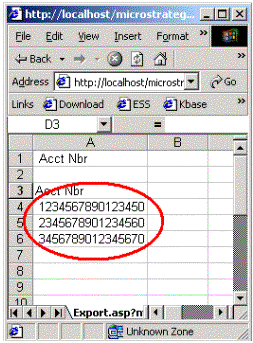
When the data is exported to Microsoft Excel, users see the following:
ka04W000001482fQAA_0EM44000000295i.gif

 
NOTE: The number is rounded after the 15th digit.
 
CAUSE:
This issue occurs because the data is being exported from Strategy Web as a numeric.
 
ACTION:
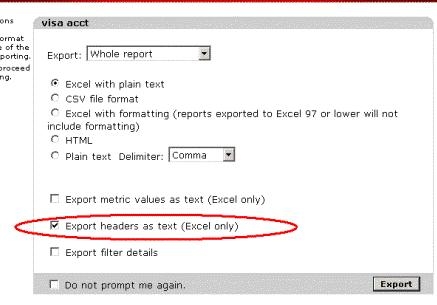
To avoid this issue, make sure to Export Attributes as text. This can be done by checking the 'Export headers as text (Excel only)' box in the Export Options page of Strategy Web.
ka04W000001482fQAA_0EM44000000295l.jpeg


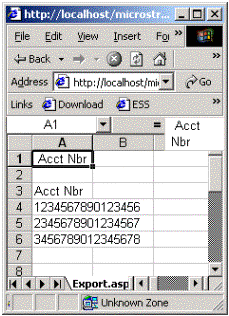
Now, when the report is exported to Excel, it looks as follows:
ka04W000001482fQAA_0EM44000000295c.gif


Comment

0 comments

Details

Knowledge Article

Published:

June 23, 2017

Last Updated:

November 10, 2019