EducationSoftwareStrategy.com
StrategyCommunity

Knowledge Base

Product

Community

Knowledge Base

TopicsBrowse ArticlesDeveloper Zone

Product

Download SoftwareProduct DocumentationSecurity Hub

Education

Tutorial VideosSolution GalleryEducation courses

Community

GuidelinesGrandmastersEvents
x_social-icon_white.svglinkedin_social-icon_white.svg
Strategy logoCommunity

© Strategy Inc. All Rights Reserved.

LegalTerms of UsePrivacy Policy
  1. Home
  2. Topics

KB8095: How to specify the metric name as the default column name of the datamart table in MicroStrategy Developer 9.4.1


Stefan Zepeda

Salesforce Solutions Architect • Strategy


KB8095: How to specify the metric name as the default column name of the datamart table in MicroStrategy Developer 9.4.1

 
In Strategy Developer 9.4.1, the column name of datamart table based on metric name is no longer generated. Users should explicitly set the 'Datamart Metric Column Alias' setting in the Metric Editor if they wish to have a coherent name for the table's column.
 
 
As default the datamart table for a simple report 'Revenue by Region' is created as shown below:
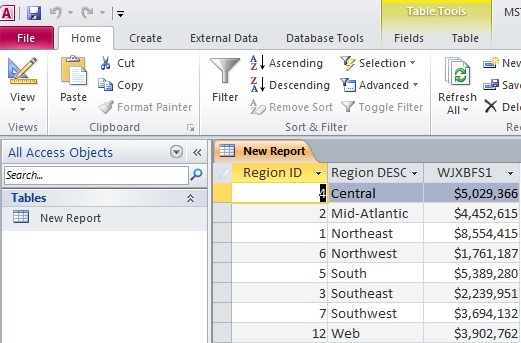


ka02R000000kYOIQA2_0EM440000002G7Z.jpeg

 
To set metrics' names as the default column name of any datamart table created in the project, users must follow the steps outlined below:
 

  • Go to 'Project Configuration' for the project (Right-click on the project to open Project Configuration editor).
  • Under 'Project Definition', choose 'Database instance's. The 'VLDB Properties' button appears. Click on that button to open the VLDB Properties editor.
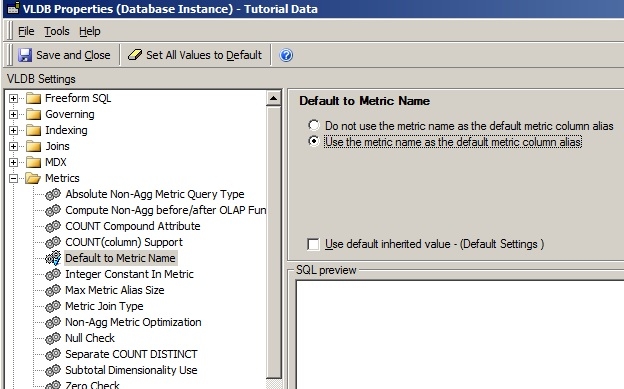
  • Open the Metrics folder. For 'Default to Metric Name', uncheck 'use default inherited value' and choose 'Use the metric name as the default metric column alias'.
     
ka02R000000kYOIQA2_0EM440000002G7f.jpeg
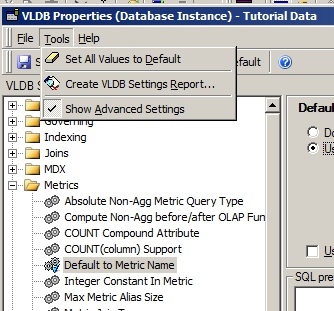
  • As this property is considered to be an Advanced Setting, 'Show Advanced Settings' under 'Tools' must be selected.
     
ka02R000000kYOIQA2_0EM440000002G7l.jpeg
  • Re-start Strategy Intelligence Server for this setting to take effect.
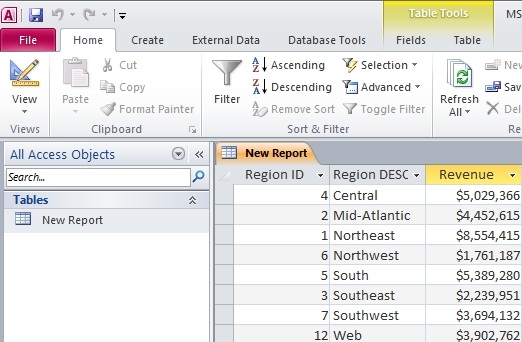
  • Run the datamart report again and the table is created as shown below:
     
ka02R000000kYOIQA2_0EM440000002G7j.jpeg


NOTE: The column name is 'Revenue' instead of 'WJXBFS1'.
 
This VLDB property is available at database level not at the report level.


Comment

0 comments

Details

Knowledge Article

Published:

June 8, 2017

Last Updated:

June 8, 2017