EducationSoftwareStrategy.com
StrategyCommunity

Knowledge Base

Product

Community

Knowledge Base

TopicsBrowse ArticlesDeveloper Zone

Product

Download SoftwareProduct DocumentationSecurity Hub

Education

Tutorial VideosSolution GalleryEducation courses

Community

GuidelinesGrandmastersEvents
x_social-icon_white.svglinkedin_social-icon_white.svg
Strategy logoCommunity

© Strategy Inc. All Rights Reserved.

LegalTerms of UsePrivacy Policy
  1. Home
  2. Topics

KB8269: How to create a LastYear'sMonth transformation in MicroStrategy Desktop 9.4.1 - Developer 10.x, when there is no transformation data available in the warehouse?


Stefan Zepeda

Salesforce Solutions Architect • Strategy


This article describes how to create a Last Year's Month transformation in MicroStrategy Desktop 9.4.1 - Developer 10.x, when there is no transformation data available in the warehou

When users must create a LastYear'sMonth transformation but there is no data for last year's month in the warehouse, the last year's data must be calculated by defining the appropriate expression.
 
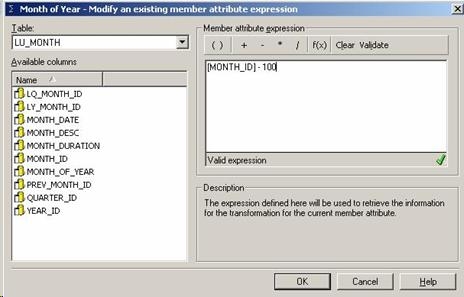
In the Strategy Tutorial project, if there was no data available for last year's month, the following syntax can be used to generate the IDs for last year's month:
 
The transformation expression for the Month attribute can be defined as:
ka02R000000kbUxQAI_0EM440000002G1A.jpeg

 
Note: Depending on the data for the IDs in the warehouse, appropriate expressions can be defined for other transformations also.


Comment

0 comments

Details

Knowledge Article

Published:

June 16, 2017

Last Updated:

June 16, 2017