EducationSoftwareStrategy.com
StrategyCommunity

Knowledge Base

Product

Community

Knowledge Base

TopicsBrowse ArticlesDeveloper Zone

Product

Download SoftwareProduct DocumentationSecurity Hub

Education

Tutorial VideosSolution GalleryEducation courses

Community

GuidelinesGrandmastersEvents
x_social-icon_white.svglinkedin_social-icon_white.svg
Strategy logoCommunity

© Strategy Inc. All Rights Reserved.

LegalTerms of UsePrivacy Policy
  1. Home
  2. Topics

KB8274: How to create a filter that uses an attribute’s DESC form in the WHERE clause instead of the ID form in MicroStrategy Developer 9.x and 10.x


Stefan Zepeda

Salesforce Solutions Architect • Strategy


By design, the form that has been set as the attribute’s key is the form that is used in the ‘Where’ clause of the Structured Query Language (SQL) when qualifying on that attribute.
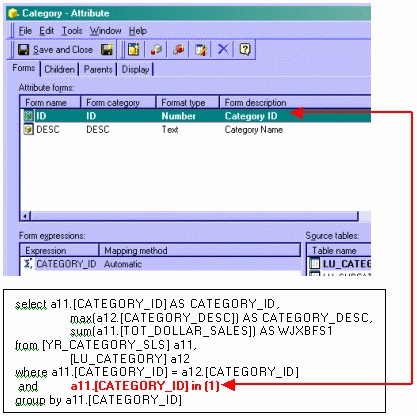
 

ka02R000000kbdBQAQ_0EM440000002G0o.gif

 
It is possible to qualify on a different form of the attribute. To achieve this, perform the following steps:
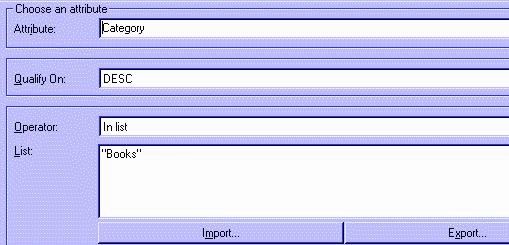
 

  • Create a filter using an Attribute Qualification and select the attribute.
  • Qualify on the DESC form.
  • Choose the operator `In List`, as shown below:
ka02R000000kbdBQAQ_0EM440000002G0n.jpeg
  •  
    NOTE: In the List window, users can import from a text file, enter values directly in the window (format: "item1", "item2", "item3", etc...) or use the Object Browser to drag the elements into the window.
     
  • Save and close this filter.

When using this filter in a report and switching to SQL view, users will observe that the DESC form is used, as shown below:
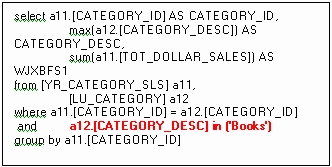
 

ka02R000000kbdBQAQ_0EM440000002G0q.gif


Comment

0 comments

Details

Knowledge Article

Published:

June 13, 2017

Last Updated:

June 13, 2017