EducationSoftwareStrategy.com
StrategyCommunity

Knowledge Base

Product

Community

Knowledge Base

TopicsBrowse ArticlesDeveloper Zone

Product

Download SoftwareProduct DocumentationSecurity Hub

Education

Tutorial VideosSolution GalleryEducation courses

Community

GuidelinesGrandmastersEvents
x_social-icon_white.svglinkedin_social-icon_white.svg
Strategy logoCommunity

© Strategy Inc. All Rights Reserved.

LegalTerms of UsePrivacy Policy
  1. Home
  2. Topics

KB8314: How to burst excel files into one compressed file from MicroStrategy Web


Community Admin

• Strategy


Bursting is a feature introduced in MicroStrategy Distribution Services that generates page-by slices and stores results to separate files via a subscription. For detailed instructions, please refer to following technical note.

Bursting is a feature introduced in Strategy Distribution Services 9.3.0 that generates page-by slices and stores results to separate files via a subscription. For detailed instructions, please refer to the following technical note.
KB3857: How to use the Bursting feature in Strategy Distribution Services 9.3.x and above
 
The following procedure describes how to include bursting files into one compressed file.
ka04W00000148O0QAI_0EM4400000029Uz.png
ka04W00000148O0QAI_0EM4400000029Ut.png
  1. Choose a document to create a file subscription.
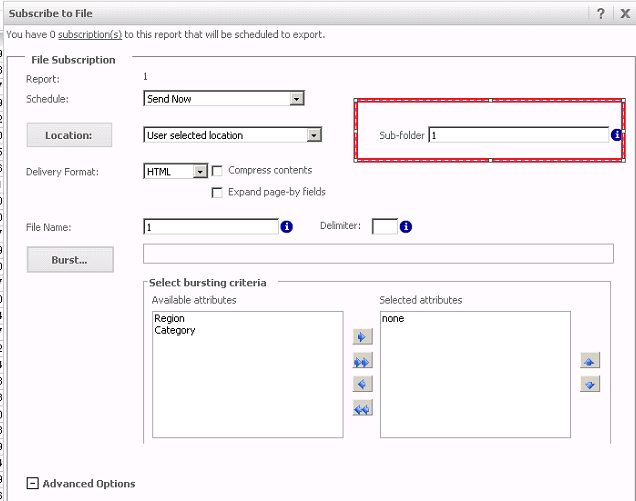
  2. In the subscription editor, configure a schedule, location, delivery format, file name, and bursting criteria.
  3. Type the name for sub-folder, as shown below.
  4. Click "Ok".
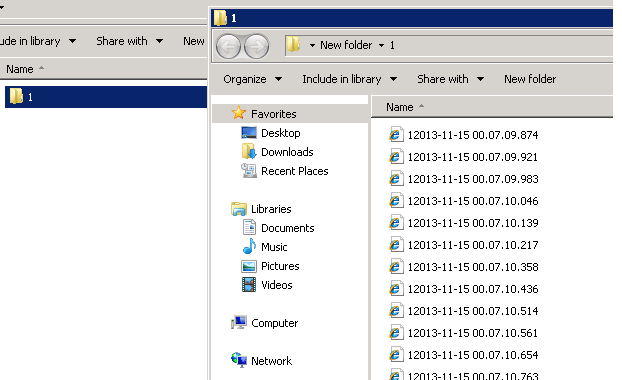
  5.  The bursting files will locate in the same sub-folder under the location, as shown below.
  6. Compress the sub-folder.


Article Reference Number:  KB8314


Comment

0 comments

Details

Knowledge Article

Published:

June 8, 2017

Last Updated:

January 1, 2019