EducationSoftwareStrategy.com
StrategyCommunity

Knowledge Base

Product

Community

Knowledge Base

TopicsBrowse ArticlesDeveloper Zone

Product

Download SoftwareProduct DocumentationSecurity Hub

Education

Tutorial VideosSolution GalleryEducation courses

Community

GuidelinesGrandmastersEvents
x_social-icon_white.svglinkedin_social-icon_white.svg
Strategy logoCommunity

© Strategy Inc. All Rights Reserved.

LegalTerms of UsePrivacy Policy
  1. Home
  2. Topics

KB8426: How to create a metric with an ApplySimple statement which will choose different metrics for calculation based on a prompt value


Stefan Zepeda

Salesforce Solutions Architect • Strategy


How to create a metric with an ApplySimple statement which will choose different metrics for calculation based on a prompt value

This document explains how to create a metric using an ApplySimple statement to choose different metrics for calculation based on a prompt value. This document will use the Strategy Tutorial project with a warehouse in SQL Server to demonstrate the concept:
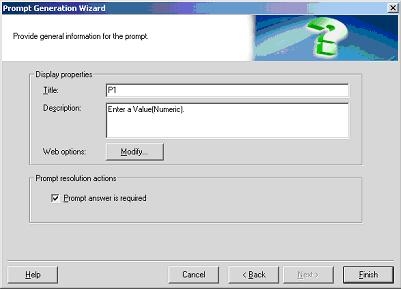
 

  • Create a numeric value prompt and name it P1.
ka02R000000kcazQAA_0EM440000002G4o.jpeg
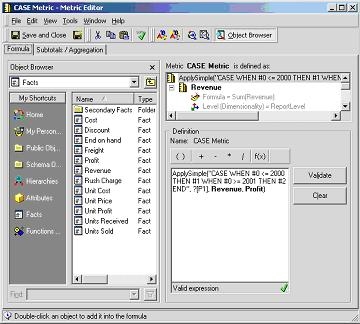
  • Create a metric with the ApplySimple statement below as its definition and name it "Case Metric":
ka02R000000kcazQAA_0EM440000002G4r.jpeg
  •  
    ApplySimple("CASE WHEN #0 <= 2000 THEN #1 WHEN #0 >= 2001 THEN #2 END", ?[P1], Revenue, Profit)
    Note: This example will prompt users for a value. Depending on the value the user enters, the ApplySimple statement will choose the appropriate metric to do the calculation. In this example, if the user enters a value of 2001 or greater, then it will choose the Profit metric for its calculation. However, if the value entered is 2000 or less, then it will use the Revenue metric for its calculation.
     
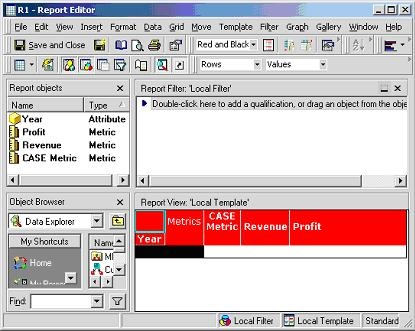
  • To demonstrate, create a report with Year and all three metrics (Case metric, Revenue, Profit), as appears below:
ka02R000000kcazQAA_0EM440000002G51.jpeg
  • Execute the report and enter 2001 as the value of the prompt. Since the value is 2001, the Case metric should use the Profit metric for its calculation. Below is the Structured Query Language (SQL) for the report with these conditions:
    select a11.YEAR_ID YEAR_ID, sum(a11.TOT_DOLLAR_SALES) WJXBFS1, sum((a11.TOT_DOLLAR_SALES - a11.TOT_COST)) WJXBFS2, CASE WHEN 2001.0 <= 2000 THEN sum(a11.TOT_DOLLAR_SALES) WHEN 2001.0 >= 2001 THEN sum((a11.TOT_DOLLAR_SALES - a11.TOT_COST)) ELSE 'Others' END WJXBFS3 from YR_CATEGORY_SLS a11 group by a11.YEAR_ID

Since the value entered is 2001, the Case Metric will use the Profit metric for its calculation and therefore it has the same result as the Profit metric, as shown below:
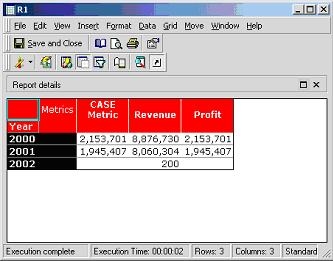
 

ka02R000000kcazQAA_0EM440000002G4t.jpeg


Comment

0 comments

Details

Knowledge Article

Published:

April 11, 2017

Last Updated:

April 11, 2017