EducationSoftwareStrategy.com
StrategyCommunity

Knowledge Base

Product

Community

Knowledge Base

TopicsBrowse ArticlesDeveloper Zone

Product

Download SoftwareProduct DocumentationSecurity Hub

Education

Tutorial VideosSolution GalleryEducation courses

Community

GuidelinesGrandmastersEvents
x_social-icon_white.svglinkedin_social-icon_white.svg
Strategy logoCommunity

© Strategy Inc. All Rights Reserved.

LegalTerms of UsePrivacy Policy
  1. Home
  2. Topics

KB8504: How to apply a "NOT" operator to an embedded filter in Microstrategy Developer 10.x


Stefan Zepeda

Salesforce Solutions Architect • Strategy


In MicroStrategy Desktop 10.x, users cannot apply a "NOT" operator when there is only one filter in the filter editor. This document describes a workaround

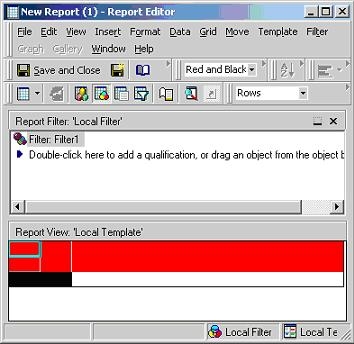
In Strategy Developer 10.x, users cannot apply a "NOT" operator when there is only one filter in the filter editor. This document describes a workaround so that the embedded filter can be added using a negative operator. Consider the following example where a user cannot apply an operator with a single existing filter:
 

ka02R000000kb7jQAA_0EM440000002G6J.jpeg

 
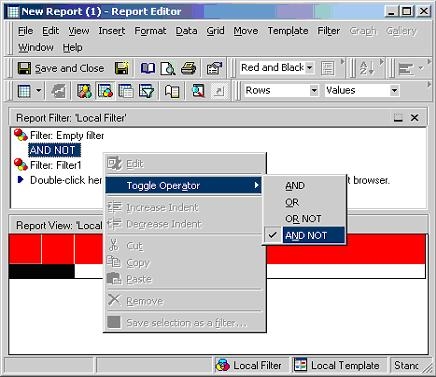
However, by adding an empty filter to the filter editor, as shown in the screen shot below, the user can then toggle to the "AND NOT" operator. The empty filter will not affect the filter definition. Alternatively, if the embedded filter is not used in other reports then the user can change the embedded filter to accommodate the antithesis of its current definition:
 

ka02R000000kb7jQAA_0EM440000002G6L.jpeg

 
8504


Comment

0 comments

Details

Knowledge Article

Published:

June 9, 2017

Last Updated:

May 24, 2018