EducationSoftwareStrategy.com
StrategyCommunity

Knowledge Base

Product

Community

Knowledge Base

TopicsBrowse ArticlesDeveloper Zone

Product

Download SoftwareProduct DocumentationSecurity Hub

Education

Tutorial VideosSolution GalleryEducation courses

Community

GuidelinesGrandmastersEvents
x_social-icon_white.svglinkedin_social-icon_white.svg
Strategy logoCommunity

© Strategy Inc. All Rights Reserved.

LegalTerms of UsePrivacy Policy
  1. Home
  2. Topics

KB8560: Users cannot modify the “Custom Expression” in the Advanced Qualification Window of a filter in MicroStrategy Developer 9.4.1 and 10.x


Stefan Zepeda

Salesforce Solutions Architect • Strategy


Users cannot modify the “Custom Expression” in the Advanced Qualification Window of a filter in MicroStrategy Developer 9.4.1 and 10.x

SYMPTOM
A user cannot modify the "Custom Expression" in the Advanced Qualification Window of a filter although a user has permission to modify the filter.
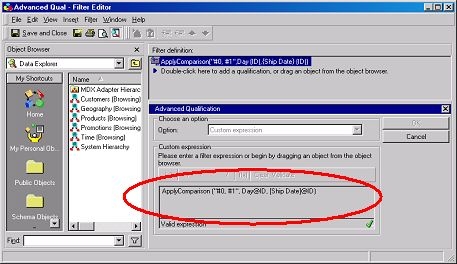
 

ka02R000000kcHfQAI_0EM440000002G6c.jpeg

 
Notice that the user has been given the appropriate permission to modify this filter object:
 

ka02R000000kcHfQAI_0EM440000002G6S.jpeg

 
CAUSE
For this window to be available, additional components will have to be enabled:
 

  1. The 'Change User Preference' privilege located under the 'Desktop Analyst' section on the Project Access tab of the user/group editor.
  2. The 'Show Advanced Qualification' setting should be turned on in the 'My Preferences' > 'Editor' tab > 'Filter Options' button.

Notes:

  • A user, or group, can not have privileges for 'Change User Preference' nor 'Show Advanced Qualification' for a filter.
  • If a user previously selected 'Show Advanced Qualification' in Filter Option but no longer has 'Change User Preference' privileges checked, then a user or a group should be able to modify 'Advanced Qualification' for a filter although a user cannot see the 'My Preference'.

ACTION
1. To enable a user to select 'Show Advanced Qualification' in Filter Option, administrator has to assign 'Change User Preference' privilege to a user. Check 'Change user preference':
 

ka02R000000kcHfQAI_0EM440000002G6W.jpeg

 
2. Ensure that the user has permissions to an object to modify or view them:
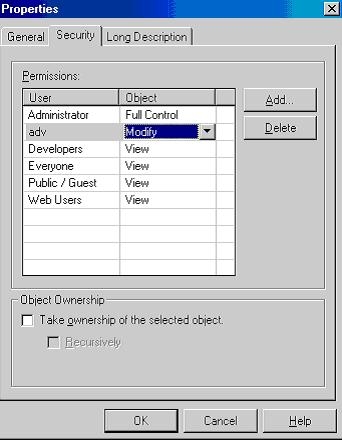
 

ka02R000000kcHfQAI_0EM440000002G6e.jpeg

 
3. Log in as the specified user and enable the "Show advanced qualification" option:
 

ka02R000000kcHfQAI_0EM440000002G6Q.jpeg

 
Note: For questions regarding this step, please refer to KB4000-7X0-0265.
 
4. The user will now be able to edit this filter.
 

ka02R000000kcHfQAI_0EM440000002G6U.jpeg


Comment

0 comments

Details

Knowledge Article

Published:

May 15, 2017

Last Updated:

May 15, 2017