SYMPTOM:
User creates a new application object using Strategy Command Manager 9.x and 10.x and receives the following error:
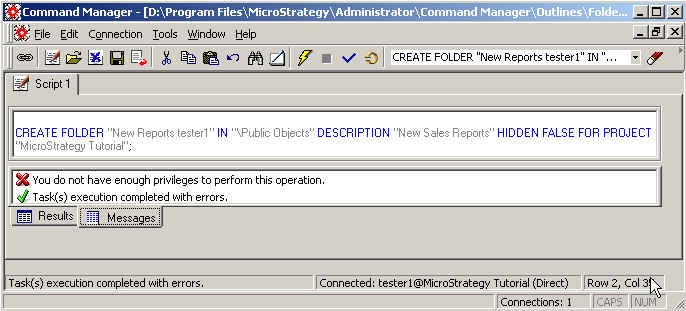
“You do not have enough privileges to perform this operation. Task(s) execution completed with errors.”
CAUSE:
In the screenshot above, the user tried to create a new folder in the Public Objects location. This error will occur if the user does not have Write permissions to the Public Objects folder. This can be verified by right-clicking on the destination folder (Public Objects) and viewing the Access Control List (ACL) > Security tab:
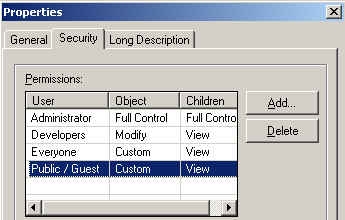
In this example, the user belongs to the Everyone group and they have a Custom permission to the Public Objects folder. By viewing the definition of the Custom permission, it is evident that the user does not have Write permissions to this object. Thus, the user cannot create a new folder inside of the Public Objects folder.
ACTION:
Grant the user Write permissions to the destination folder or create the new object into another folder in which the user does have Write permissions.
