SYMPTOM:
Consider the following example: A double-byte operating system is used with Simplified Chinese Windows 2000. When a project is created in English, or another single-byte interface, all autostyles, such as "Accounting" or "Agent", have single-byte fonts. Even though these single-byte fonts used in the autostyles can't display Chinese characters, the warehouse contains Chinese characters and they are displayed correctly with these single-byte autostyles. This is due to the fact that Strategy Desktop overwrites autostyle fonts with Desktop Preferences settings. If operating system is Chinese, the installation sets the following values in Desktop Preferences -> International -> Default character as follows:
However, once the report is exported to Portable Document Format (PDF) with a Simplified Chinese version, all Chinese characters are missing.
CAUSE:
The PDF picks up the embedded fonts in the associated autostyle.
ACTION:
To export to PDF without recreating the project, users can take advantage of the "Find and Replace" feature available in Strategy Desktop 7i - 7.2.3 and newer. This feature can be used to do a mass replace of the autostyles that are applied to the reports in the double-byte project.
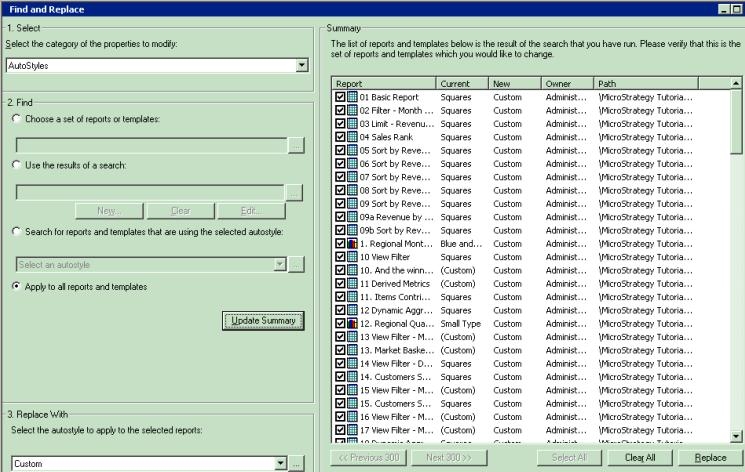
NOTE:
If a user prefers to use different autostyles such as "Accounting" or "Agent", then each custom autostyle needs to be created and replaced separately. Furthermore, if the template was used to create all or most of reports in the project, it may be easier to replace the template by creating a custom template instead of an autostyle.
