If a report has multiple qualifications, each of which contains its own value prompt, a user will be prompted multiple times when executing the report. This is inconvenient if the prompt answers are all the same. Ideally, a user will be prompted only once on all attributes with that prompt answer.
Perform the following steps to achieve this:
Below is an example that describes in detail how to use this feature to qualify on multiple date attributes with one prompt:
A report has two attribute qualifications, both on dates. The report filters on "Customer Birth Date" and "Ship Date" and report designer wants to use date prompts for more flexibility. The report designer also notices the prompt answers for both qualifications are always the same. So the where clause of the generated Structured Query Language (SQL) is as follows:
where a11. = ## and a13. <= ##
and are always the same.
Therefore, prompting for a date once is enough, although two qualifications require prompt answers. The following procedure describes how to achieve this:
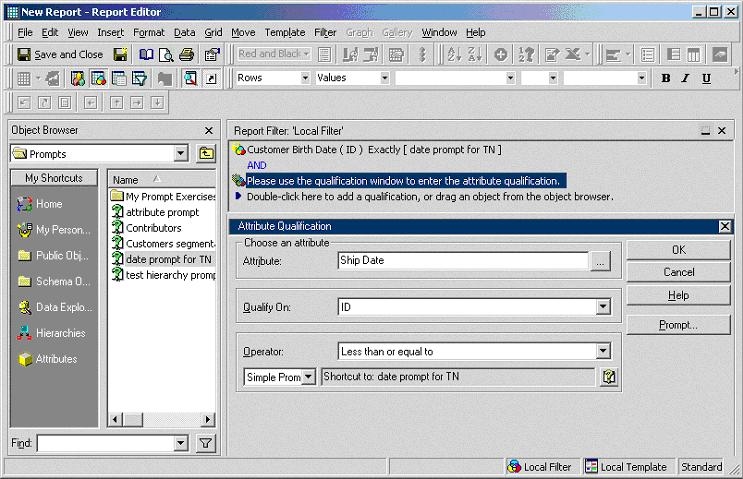
When executing the report, a user is prompted for the date once and the report executes with two filters; one filter is called Customer Birth Date = < a user specified date > and the other called Ship Date <= < a user specified date>.
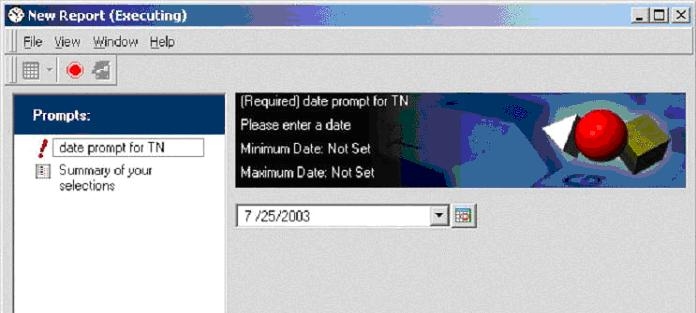
Below is the prompt that the user receives when executing the report:
Below is the SQL generated for the same report:
select distinct a11. AS CUST_BIRTHDATE,
a13. AS SHIP_DATE,
a11. AS CUSTOMER_ID,
a11. AS CUST_LAST_NAME,
a11. AS CUST_FIRST_NAME
from a11,
a12,
a13
where a11. = a12. and
a12. = a13.
and (a11. = #2003-07-25#
and a13. <= #2003-07-25#)
