EducationSoftwareStrategy.com
StrategyCommunity

Knowledge Base

Product

Community

Knowledge Base

TopicsBrowse ArticlesDeveloper Zone

Product

Download SoftwareProduct DocumentationSecurity Hub

Education

Tutorial VideosSolution GalleryEducation courses

Community

GuidelinesGrandmastersEvents
x_social-icon_white.svglinkedin_social-icon_white.svg
Strategy logoCommunity

© Strategy Inc. All Rights Reserved.

LegalTerms of UsePrivacy Policy
  1. Home
  2. Topics

KB8718: Derived metrics of type “Percent to Total, Page Total” return incorrect data when attributes are added or removed from the report grid in Microstrategy Developer 9.x - 10.x


Stefan Zepeda

Salesforce Solutions Architect • Strategy


The following procedure uses the MicroStrategy Tutorial project to illustrate an issue where derived metrics of type “Percent to Total, Page Total” return incorrect data.

The following procedure uses the Strategy Tutorial project to illustrate an issue where derived metrics of type “Percent to Total, Page Total” return incorrect data. This occurs only when attributes are added or removed from the report grid in Strategy Developer 9.x - 10.x.

  • In Strategy Developer, create a report with the following specifications:
    1. Attribute Region on the rows.
    2. Attributes Year and Month on the page-by
    3. Metric Revenue on the columns.
    4. Subtotals enabled.
ka02R000000kbgqQAA_0EM440000002G5d.gif
  • Right-click on the metric Revenue. Select Insert > Percentage to Total > Page Total:
ka02R000000kbgqQAA_0EM440000002G5W.gif
  • Move the attribute Month from the page-by to the Report objects panel.
  • Move the attribute Quarter from the Report objects panel to the page-by.

Note that the derived metric 'Percent To Page Total (Revenue)' is not calculating its percentages based on the grand total of $1,884,444 for the metric Revenue for this page. The result is that the grand total for the derived metric 'Percent To Page Total (Revenue)' displays 21.23% and not 100%.
 

ka02R000000kbgqQAA_0EM440000002G5b.gif

 
CAUSE:
This behavior occurs by design. The dimensionality of the derived metric 'Percent To Page Total (Revenue)' when it was created was for Year and Month. The dimensionality of derived metrics is static and does not change when attributes are added or removed from the report grid.
The following screen shot illustrates that the dimensionality of the derived metric' Percent To Page Total (Revenue)' remains at Year and Month after it is exchanged with the attributes Month and Quarter in the report grid:
 

ka02R000000kbgqQAA_0EM440000002G5Z.gif

 
WORKAROUND:
To workaround this design, employ one of the following two options:
 

  • Create a new derived metric Percentage to Total > Page Total after the attributes are either added or removed from the report grid.
ka02R000000kbgqQAA_0EM440000002G5V.gif
  • Manually set the dimensionality of the derived metric to reflect changes in the attributes appearing in the report grid. For the example given above, Month would be replaced with Quarter, as shown in the screen shot below:
ka02R000000kbgqQAA_0EM440000002G5T.gif

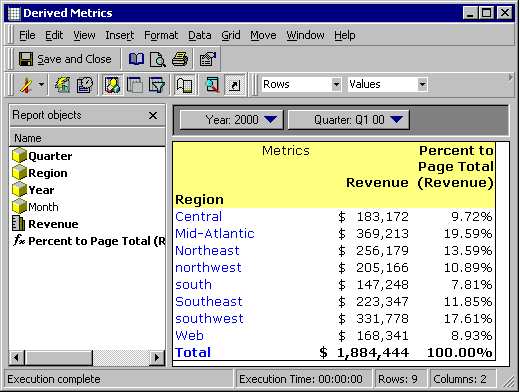
In the following screenshot, the derived metric 'Percent To Page Total (Revenue) calculates its percentage based on the grand total of $1,884,444 for the metric Revenue for this page. The grand total for the derived metric 'Percent To Page Total (Revenue)' now displays 100%:
 

ka02R000000kbgqQAA_0EM440000002G5U.gif


Comment

0 comments

Details

Knowledge Article

Published:

June 12, 2017

Last Updated:

June 12, 2017