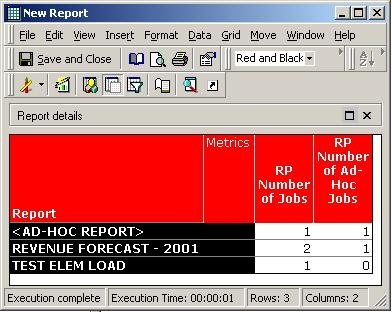
The following report is an example of how the ad-hoc jobs may appear as a part of the regular report executions in Strategy Enterprise Manager 9.x:
Ad hoc jobs that are associated with reports in Strategy Enterprise Manager are drill or attribute element requests originated from a report. A report execution is also considered as ad-hoc when the report is executed without saving it first i.e. if the report object does not exist in the metadata at the time of report execution.
When the "Report" attribute is on the template, jobs associated with element requests appear under the < AD-HOC REPORT > classification because they are not associated with their parent reports in the statistics. Drill jobs can be linked to their parent reports because they assume the same ID as their parent report. In the example above, the report "Revenue Forecast - 2001" was executed once and was subsequently drilled from once. However, the report "test elem load" was executed only once but contains an attribute prompt which requires an element load.
The element load and the drill jobs can be filtered using the corresponding "Element Load Indicator" and "Drill Indicator" attributes in the Strategy Enterprise Manager project.
