EducationSoftwareStrategy.com
StrategyCommunity

Knowledge Base

Product

Community

Knowledge Base

TopicsBrowse ArticlesDeveloper Zone

Product

Download SoftwareProduct DocumentationSecurity Hub

Education

Tutorial VideosSolution GalleryEducation courses

Community

GuidelinesGrandmastersEvents
x_social-icon_white.svglinkedin_social-icon_white.svg
Strategy logoCommunity

© Strategy Inc. All Rights Reserved.

LegalTerms of UsePrivacy Policy
  1. Home
  2. Topics

KB8731: The select clause in the report SQL displays multiple aliases for the same column name in MicroStrategy


Stefan Zepeda

Salesforce Solutions Architect • Strategy


This article notes a situation with repeated columns in SQL generation

SYMPTOM:
 
The select clause in the report Structured Query Language (SQL) displays multiple aliases for the same column name in Strategy.
 
The following procedure uses the Strategy Tutorial project to describe how to reproduce this behavior:
 

  • Create a copy of attribute Region and name it Double_Region.
  • Create another copy of attribute Region and name it Triple_Region.
  • Update schema.
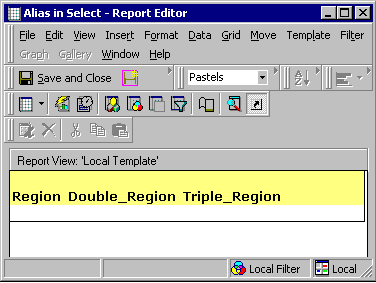
  • Create a report with attributes Region, Double_Region, and Triple_Region on the rows. The report will appear as follows:
ka02R000000kYiMQAU_0EM440000002G5X.gif
  • Click on 'View' and select 'SQL View':
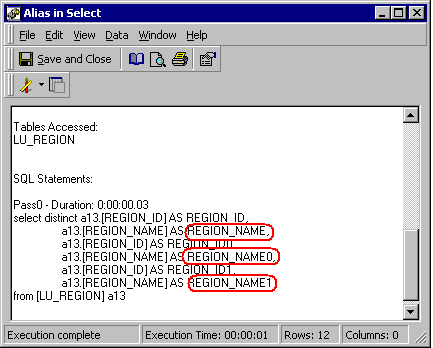
ka02R000000kYiMQAU_0EM440000002G5a.gif

 
Note that the select clause repeats the table column REGION_NAME three times as represented by the aliases REGION_NAME, REGION_NAME0, and REGION_NAME1. This also occurs with REGION_ID.
 
CAUSE:
 
This behavior occurs when multiple attributes in a report map to the same column of the same table in the data warehouse.
 
Attributes Double_Region and Triple_Region are identical copies of attribute Region, therefore all three attributes map to the same REGION_ID and REGION_NAME columns in data warehouse. Different aliases are needed to ensure uniqueness for the three attributes as the same column can come from a different table and contain different results. That means this behavior occurs by design since:
 

  • REGION_ID and REGION_NAME are used to display the attribute Region.
  • REGION_ID0 and REGION_NAME0 are used to display the attribute Double_Region.
  • REGION_ID1 and REGION_NAME1 are used to display the attribute Triple_Region.


Comment

0 comments

Details

Knowledge Article

Published:

June 5, 2017

Last Updated:

June 5, 2017