EducationSoftwareStrategy.com
StrategyCommunity

Knowledge Base

Product

Community

Knowledge Base

TopicsBrowse ArticlesDeveloper Zone

Product

Download SoftwareProduct DocumentationSecurity Hub

Education

Tutorial VideosSolution GalleryEducation courses

Community

GuidelinesGrandmastersEvents
x_social-icon_white.svglinkedin_social-icon_white.svg
Strategy logoCommunity

© Strategy Inc. All Rights Reserved.

LegalTerms of UsePrivacy Policy
  1. Home
  2. Topics

KB8784: The list of subscriptions is not visible when users log into the portal site using MicroStrategy Narrowcast Server Subscription Portal 10.x


Community Admin

• Strategy


This Knowledge Base article describes list of subscriptions is not visible when users log into the portal site using MicroStrategy Narrowcast Server Subscription Portal 10.x. This is because the IDs of sites and channels are different after Microstrategy Subscription Portal site was deleted and recreated. The solution is to replace the IDs of the channels in the table MSTRSUBSCRIPTIONS with the IDs found in the Portal Repository tables.

SYMPTOM:
When users log in to the Strategy Subscription Portal and click on Subscriptfions, the list of services that the user had subscribed to do not appear. However, newly created subscriptions do appear.
 
CAUSE:
The Strategy Subscription Portal site was deleted and recreated. When the site was deleted, the entries for the site name, channels, etc. stored in the Portal Repository tables (MSTROBJXMLDEFN, MSTROBJHIER and MSTROBJPROPS) were removed. When the site is recreated, these objects will have different IDs. The ID for the channels will defer to the value stored in column MR_CHANNEL_ID of the table MSTRSUBSCRIPTIONS because the Subscription Book Repository was not updated. Thus, the Strategy Narrowcast Server Subscription Portal will not display the Subscriptions since the IDs are different.
 
ACTION:
Replace the IDs of the channels in the table MSTRSUBSCRIPTIONS with the IDs found in the Portal Repository tables using the steps below:
 

  1. Execute the following Structured Query Language (SQL) statement to obtain the old channel's ID, by user:
    SELECT a.MR_ADDRESS_NAME, s.MR_USER_ID, s.MR_CHANNEL_ID
    FROM %prefix%MSTRADDRESSES a, %prefix%MSTRSUBSCRIPTIONS s
    WHERE a.MR_USER_ID = s.MR_USER_ID
    ORDER BY s.MR_CHANNEL_ID, s.MR_USER_ID, a.MR_ADDRESS_NAME
  2. Replace "%prefix%" with the table prefix which is being used.

NOTE: This SQL is for SQL Server only. If another database is being used, modify the SQL to comply with the corresponding database.
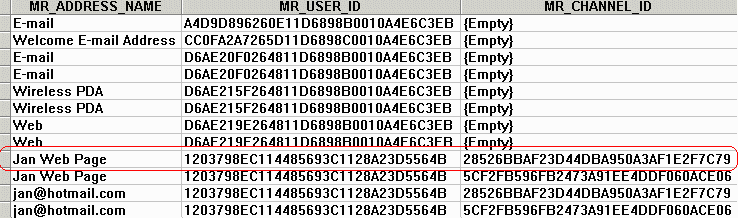
ka04W000000ObuKQAS_0EM440000002Btq.gif


ka04W000000ObuKQAS_0EM440000002Btu.gif


WARNING:

  • Execute the following SQL to obtain the current channel's ID:
    SELECT * FROM %prefix%MSTROBJPROPS
    WHERE MR_OBJECT_TYPE = 1002 and MR_PROP_VALUE = 'name of the channel'
  • Where 'name of the channel' is the name of the channel where the user previously had subscriptions.
     
  • Copy the value under MR_OBJECT_ID.
  • Change the channel ID for all the subscriptions that were using the deleted channel. Replace the value under MR_CHANNEL_ID in the table MSTRSUBSCRIPTIONS with the value from step #3. Use the following SQL to change the appropriate channel ID:
    UPDATE %prefix%MSTRSUBSCRIPTIONS
    SET MR_CHANNEL_ID = 'new channel ID'
    WHERE MR_CHANNEL_ID = 'old channel ID'
  • Perform steps #1 - #4 to replace the ID of each different channel.


Manually editing values in the Strategy Narrowcast Server Repository incorrectly may cause serious, project-wide problems that may make your project unusable. Since these are user-initiated changes, they are not covered by any Strategy warranty. Users are strongly encouraged to backup the Strategy Narrowcast Server Repository prior to any alteration.
 
 
8784


Comment

0 comments

Details

Knowledge Article

Published:

June 22, 2017

Last Updated:

June 8, 2018