EducationSoftwareStrategy.com
StrategyCommunity

Knowledge Base

Product

Community

Knowledge Base

TopicsBrowse ArticlesDeveloper Zone

Product

Download SoftwareProduct DocumentationSecurity Hub

Education

Tutorial VideosSolution GalleryEducation courses

Community

GuidelinesGrandmastersEvents
x_social-icon_white.svglinkedin_social-icon_white.svg
Strategy logoCommunity

© Strategy Inc. All Rights Reserved.

LegalTerms of UsePrivacy Policy
  1. Home
  2. Topics

KB8797: How to change the warehouse prefix for all existing tables and set the default value for the new ones in MicroStrategy Architect


Community Admin

• Strategy


Article outlines how to change the warehouse prefix for all existing tables and set the default value for the new ones in MicroStrategy Architect

Perform the following steps to change the prefixes for all existing tables and set the default value for newly created tables:
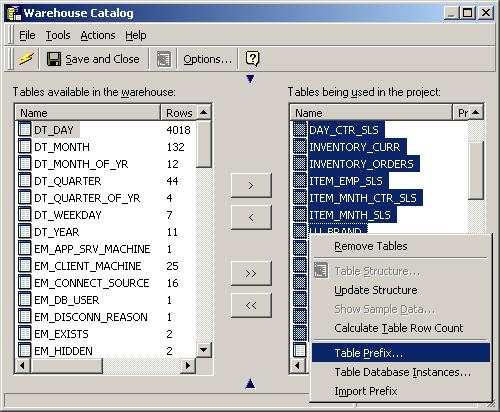
  • Highlight all the relevant tables and right-click and select 'Table Prefix'.
  • Choose the relevant prefix.
ka04W000000OeNYQA0_0EM440000002G3O.jpeg
  • Change the default to the desired prefix.

To ensure that all new created tables automatically receive the new prefix, users must change the default setting.
 
Select the “Set a default prefix" option under the warehouse catalog option "View - Table Prefixes", as shown in the screen shot below:
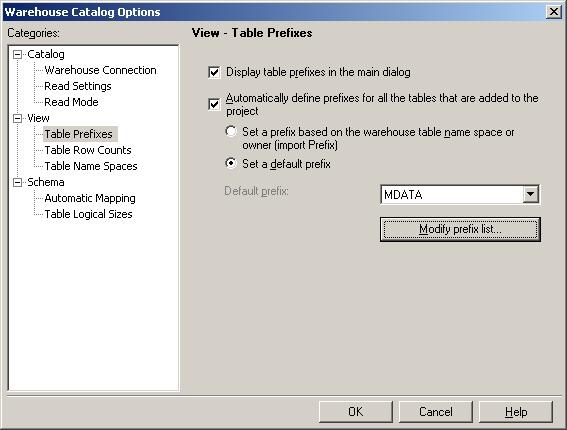
ka04W000000OeNYQA0_0EM440000002G3L.jpeg

Note: It is necessary to first add the prefixes manually into the prefix list before it can be selected.


Comment

0 comments

Details

Knowledge Article

Published:

June 10, 2017

Last Updated:

June 10, 2017