EducationSoftwareStrategy.com
StrategyCommunity

Knowledge Base

Product

Community

Knowledge Base

TopicsBrowse ArticlesDeveloper Zone

Product

Download SoftwareProduct DocumentationSecurity Hub

Education

Tutorial VideosSolution GalleryEducation courses

Community

GuidelinesGrandmastersEvents
x_social-icon_white.svglinkedin_social-icon_white.svg
Strategy logoCommunity

© Strategy Inc. All Rights Reserved.

LegalTerms of UsePrivacy Policy
  1. Home
  2. Topics

KB8800: How to rename attribute and metric column headers in a MicroStrategy Developer 9.x report


Stefan Zepeda

Salesforce Solutions Architect • Strategy


How to rename attribute and metric column headers in a MicroStrategy Developer 9.x-10.x report using "alias" from the report data options.

In order to rename attribute and metric column headers in Strategy 9.x, it is necessary to use "alias" from the report data options. In the following example, the attribute column header for "Call Center" and the metric "Revenue" will be renamed to "Rev":
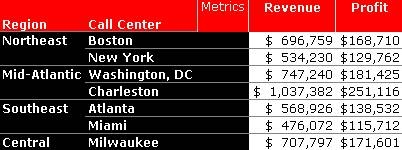
 

ka02R000000kbGJQAY_0EM440000002G4T.jpeg


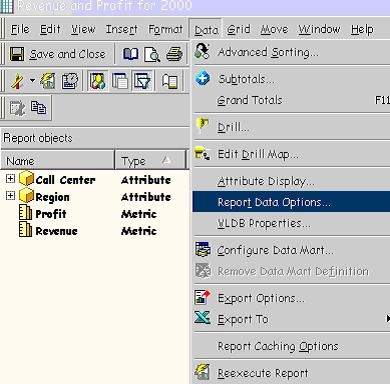
  • In the report editor, navigate to "Report Data Options" under the "Data" menu:
ka02R000000kbGJQAY_0EM440000002G4l.jpeg
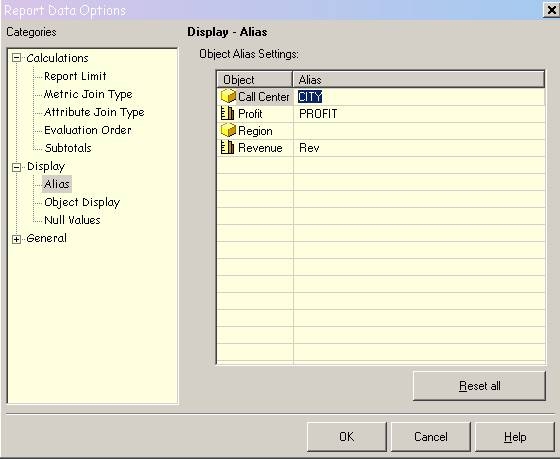
  • Under "Display", click on "Alias" and enter the alias for the specifed report column header. Click "OK."
ka02R000000kbGJQAY_0EM440000002G4R.jpeg
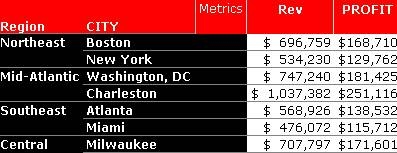
  • Confirm the new alias on the report:
ka02R000000kbGJQAY_0EM440000002G4m.jpeg


Comment

0 comments

Details

Knowledge Article

Published:

May 27, 2017

Last Updated:

August 3, 2017