EducationSoftwareStrategy.com
StrategyCommunity

Knowledge Base

Product

Community

Knowledge Base

TopicsBrowse ArticlesDeveloper Zone

Product

Download SoftwareProduct DocumentationSecurity Hub

Education

Tutorial VideosSolution GalleryEducation courses

Community

GuidelinesGrandmastersEvents
x_social-icon_white.svglinkedin_social-icon_white.svg
Strategy logoCommunity

© Strategy Inc. All Rights Reserved.

LegalTerms of UsePrivacy Policy
  1. Home
  2. Topics

KB8810: How to display a "0" instead of a negative metric value in a report without using thresholds or apply functions in MicroStrategy Developer


Stefan Zepeda

Salesforce Solutions Architect • Strategy


Display negative values as zero in a report without using thresholds or 'Apply' functions

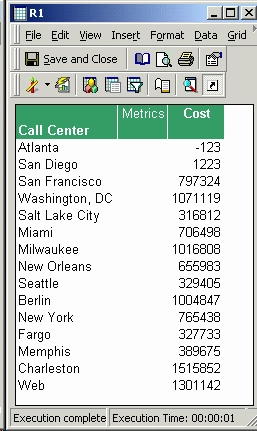
Observe in the following screenshot that the cost for Atlanta is a negative value: "-123".
ka02R000000kZveQAE_0EM440000002G4e.gif

The following procedure describes how to display this negative metric value with "0":
 

  • Open the metric in the metric editor.
  • Go to Tools > Formatting > Values.
  • In the Format Cells window, select the Number tab.
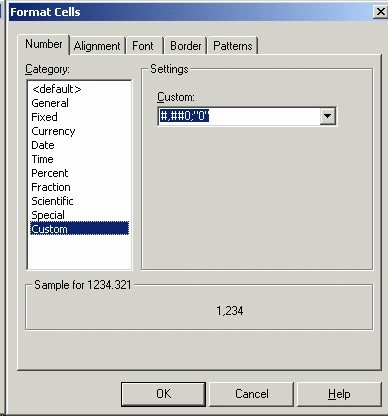
  • Click on Custom in the Category section and select (#,##0; "0") from the Custom drop down box, as shown in the screen shot below:
ka02R000000kZveQAE_0EM440000002G4f.gif
  • Click 'OK' and save and close the metric editor.

Re-execute the report. The negative data will now be displayed as "0", as shown in the screen shot below:
 

ka02R000000kZveQAE_0EM440000002G4h.gif


Comment

0 comments

Details

Knowledge Article

Published:

June 2, 2017

Last Updated:

June 2, 2017