EducationSoftwareStrategy.com
StrategyCommunity

Knowledge Base

Product

Community

Knowledge Base

TopicsBrowse ArticlesDeveloper Zone

Product

Download SoftwareProduct DocumentationSecurity Hub

Education

Tutorial VideosSolution GalleryEducation courses

Community

GuidelinesGrandmastersEvents
x_social-icon_white.svglinkedin_social-icon_white.svg
Strategy logoCommunity

© Strategy Inc. All Rights Reserved.

LegalTerms of UsePrivacy Policy
  1. Home
  2. Topics

KB8846: Unable to save a custom group object and filter object with the same name in the same folder in Microstrategy Developer


Stefan Zepeda

Salesforce Solutions Architect • Strategy


Users are unable to save a filter object into a folder that contains a custom group with the same name.

SYMPTOM:
“An object with name <filter_name> and type ‘Filter’ already exists in the destination folder” error message is received when attempting to same a filter object into a folder that contains a custom group object with the same name.
 
The following procedure uses the Strategy Tutorial project to illustrate the issue:
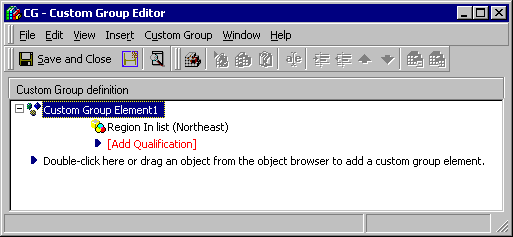
  • Create a custom group named 'CG'.
ka044000000kJZoAAM_0EM440000002G42.gif
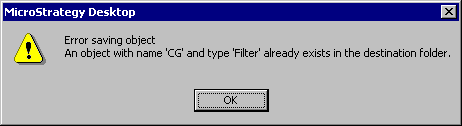
  • Create a filter and attempt to save the filter with the same name and in the same folder as the custom group 'CG' created above. The following error message will display:
ka044000000kJZoAAM_0EM440000002G43.gif

Error message:
Error saving object
An object with name 'CG' and type 'Filter' already exists in the destination folder.
CAUSE:
This is a known issue in Strategy Developer.
 
ACTION:
Strategy will continue to investigate and post updates as soon as they are available.
 
WORKAROUND:
Save the filter object and the custom group object in separate folders or rename the custom group and/or filter so these objects have different names.
 
KB8846


Comment

0 comments

Details

Knowledge Article

Published:

June 5, 2017

Last Updated:

January 4, 2019